The Enriched Funder Profile
What an enriched Funder Profile delivers, how it's contextualized against your org, and how it differs from the lightweight Prospect Brief — generated by the /profile skill from a proprietary database of 800K+ organizations plus web research.
- How It's Different from a Prospect Brief
- What's in a Funder Profile
- Contextualized Against Your Org
- How to Generate One
5 min
reading time
Interactive knowledge check
The Enriched Funder Profile
Traditional funder research takes hours per funder and produces a Word doc that’s stale by the next quarter. You open the funder’s website, click through to their grants page, search ProPublica for the latest 990, scroll through Foundation Directory, copy giving stats into a spreadsheet, hunt LinkedIn for the program officer’s background, and stitch it all into a memo. The next time you need the same intelligence, half of it has changed and you’re back at the start.
The Funder Profile is Grantable’s answer. One document, generated on demand, drawing on a proprietary database of 800K+ U.S. organizations with IRS 990-PF data, plus web research for the public layer most databases can’t see. You read it in five minutes; you have what a research analyst would have produced in a week.
How It’s Different from a Prospect Brief
You met the Prospect Brief in the Discover module. It’s the lightweight scoring document the /prospecting skill writes during a search — designed for triage, optimized for “is this funder worth a closer look?”
The Funder Profile is the deeper artifact you generate when the answer is yes:
Prospect Brief
Written during /prospecting. Short. Per-funder. Includes Why This Is a Match, Key Data Points, How Much We Know About This Funder, Notable Grantees, Sources, plus a Your Notes checklist and a Decision Trail that records what happened to the prospect. The triage card — and the working sheet you keep adding to.
Funder Profile
Written on demand by /profile. Longer. Per-funder, per-application, per-board-meeting — whenever you need real depth. Pulls fuller 990 history, grant patterns, geographic detail, key people, and contextualizes the whole picture against your org.
The Prospect Brief tells you whether a funder is worth pursuing. The Funder Profile tells you how to pursue them. Different stages, different depths, both editable as files in your Library.
What’s in a Funder Profile
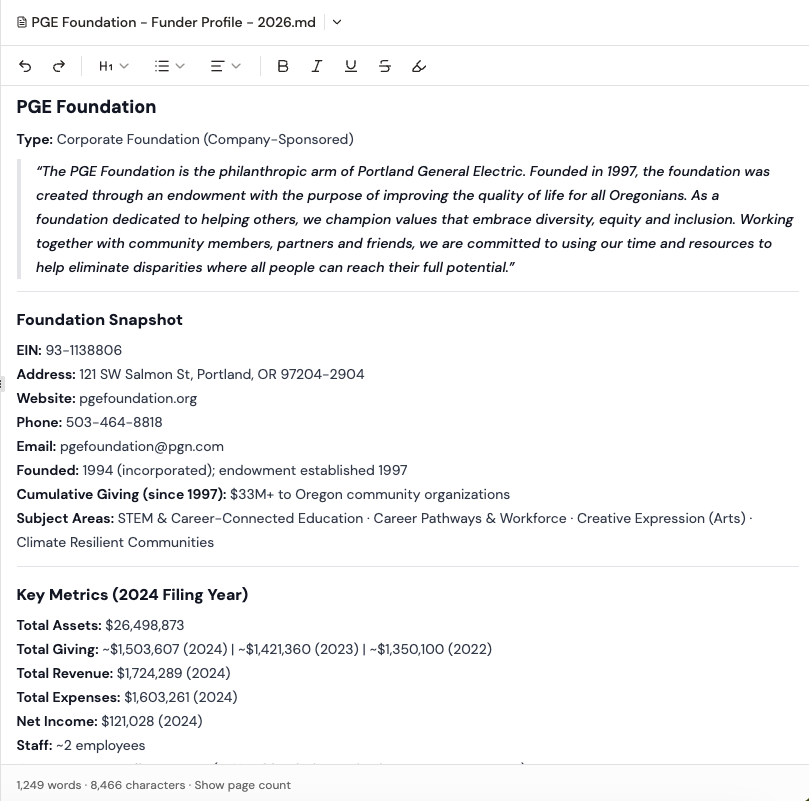
A complete Funder Profile pulls together five layers of intelligence:
Giving overview
Total annual giving, number of grants per year, average and median grant size, year-over-year trend (growing, stable, declining). The headline numbers a board member or ED needs in the first ten seconds.
Program priorities — what they actually fund
Where the dollars went, by program category. A funder's website may say 'we support education'; the 990 shows they gave $2M to charter schools and $50K to literacy programs. The profile surfaces that distinction explicitly.
Geographic patterns
Where the money goes, not where the funder is based. Many 'national' funders concentrate 60–80% of giving in three or four states. The geographic breakdown tells you whether you're in the funder's footprint or competing for the leftovers.
Grantee list with org-similarity flags
The most actionable section. Recent grantees, grant amounts, and a flag against organizations similar to yours in mission, size, or geography. If a funder consistently supports orgs of your size doing your kind of work, that's a stronger fit signal than any score.
Key people
Program officers, board members, key staff — pulled from 990-PF filings and supplemented with web research. Useful before an outreach email, an introduction, or a phone call.
Contextualized Against Your Org
The most important detail isn’t in any one section — it’s how the whole profile reads against your organization’s profile.
When your /Library/Profile.md is populated, every funder profile gets generated with your org as the context. So instead of seeing “annual giving: $5M, average grant size: $150K,” you see “their $5M annual giving and $150K average grant size aligns with your typical ask range of $100K–$200K — you’d be a typical-sized grantee, not an outlier in either direction.”
That contextualization is the difference between funder data and funder intelligence.
If your org profile is sparse, funder profiles will note it: “I can provide deeper alignment insights when more of your organization profile is filled in.” The fastest way to improve every future Funder Profile is to invest five minutes in /Library/Profile.md first.
How to Generate One
Two ways to get a Funder Profile:
- Directly via
/profile— “Use /profile to generate a Funder Profile on the Meyer Memorial Trust.” Grantable searches its database, pulls the 990 data and grant history, supplements with web research, and contextualizes against your org. Takes a couple of minutes. - From a Prospect Brief — when you’ve accepted a prospect and want to go deeper, ask Grantable to “create a full Funder Profile on this one.” The skill picks up the brief’s context and expands.
The output saves to /Prospecting/{Funder Name} - Funder Profile - {Date}.md — a real file in your library, editable, shareable, version-tracked. Like every other Grantable artifact, the template at /Skills/profile/Funder Profile.md is a file you can edit. Change the section structure, swap in your team’s preferred rubric, add a “Past Outreach” section if you always want one — and future profiles follow your template.
You're preparing an LOI to a foundation that scored as a Strong Fit in last week's prospecting search. The Prospect Brief gave you the basics. What's the most efficient next move before you start writing?
- The Funder Profile is the deeper-than-a-Prospect-Brief research artifact, generated on demand by the /profile skill from 800K+ org database + 990-PF data + web research
- Five layers: giving overview, what they actually fund (vs. what the website says), geographic patterns, grantee list with org-similarity flags, key people
- When your /Library/Profile.md is populated, every Funder Profile is contextualized against your org — that's where 'data' becomes 'intelligence'
- The /Skills/profile/Funder Profile.md template is editable — change the structure once, and every future profile follows your team's format
Next Lesson
A profile is a snapshot in time. Funders shift priorities, open new programs, and announce RFPs without warning. Next we’ll set up funder monitoring — so you hear about a change when it happens, not three months later when the application window has closed.
Notice an error or have a question about this lesson?
Get in touchHave questions about this lesson?
Ask Grantable to explain concepts, suggest how they apply to your organization, or help you think through next steps.