Building a Proactive Pipeline — A Walkthrough
Step-by-step: from a discovery search to a shortlist of strong-fit funders you've already profiled, briefed, and set up to monitor — before any of them have published an RFP.
- Before you start
- Stage 1: Open `/prospecting` with a sharp ask
- Stage 2: Walk the prospect table top to bottom
- Stage 3: Generate Funder Profiles for the accepted prospects
- Stage 4: Brief the strongest fits
- Stage 5: Set up monitoring so the RFP doesn't slip past
- Stage 6: Log relationship moments as they happen
- Cadence over time
8 min
reading time
Interactive knowledge check
Building a Proactive Pipeline — A Walkthrough
A grant team that only applies when an RFP shows up is permanently in scramble mode. The deadline is set by the funder; the prep starts when the email arrives; the team is one week out from submission before they’ve decided whether the foundation is even a fit. Some of the resulting applications win. Most of them don’t, because the strongest applicants didn’t first hear about the foundation when the RFP dropped — they’d been in conversation with the program officer for months, and their proposal was a structured version of an interest the funder had already validated.
This lesson is the walkthrough for the other path: identify the funders you want before they’re soliciting applications, build the intelligence on each, brief the strongest fits, and set up monitoring so the moment a cycle opens you’re ready. Open the lesson in one tab and Grantable in another. Plan to spend about an hour the first time through; quicker each subsequent round.
Before you start
You’ll want:
- Your Org Profile filled out in
/Library. Every step here uses it as the comparison anchor. - A clear funding need to search against. “Funders who support youth literacy programs in [your state] at $25K-$100K range” is workable; “general funding” isn’t.
- An hour of focus. A discovery session done in five-minute increments produces a fragmented prospect table. Block the time.
Stage 1: Open /prospecting with a sharp ask
Open Grantable. Start a fresh chat. Type / to bring up the skill picker, then pick prospecting (or just type /prospecting directly). The skill activates and prompts you for your search intent.
Be specific:
“/prospecting — find foundations and corporate funders supporting youth literacy programs in Oregon and Washington at the $25K to $100K range. Prioritize funders who’ve made grants in the last 24 months. Include both private foundations and corporate giving programs.”
Specificity is the difference between a usable shortlist and a wall of vaguely-related funders. Geography, sector, scale, recency, funder type — pin them down. The AI does better with a tight brief than a loose one.
A few minutes later, Grantable returns a prospect table — usually 30 to 60 candidate funders, ranked by relevance signals from the database (sector match, geographic match, scale match, recent giving activity).
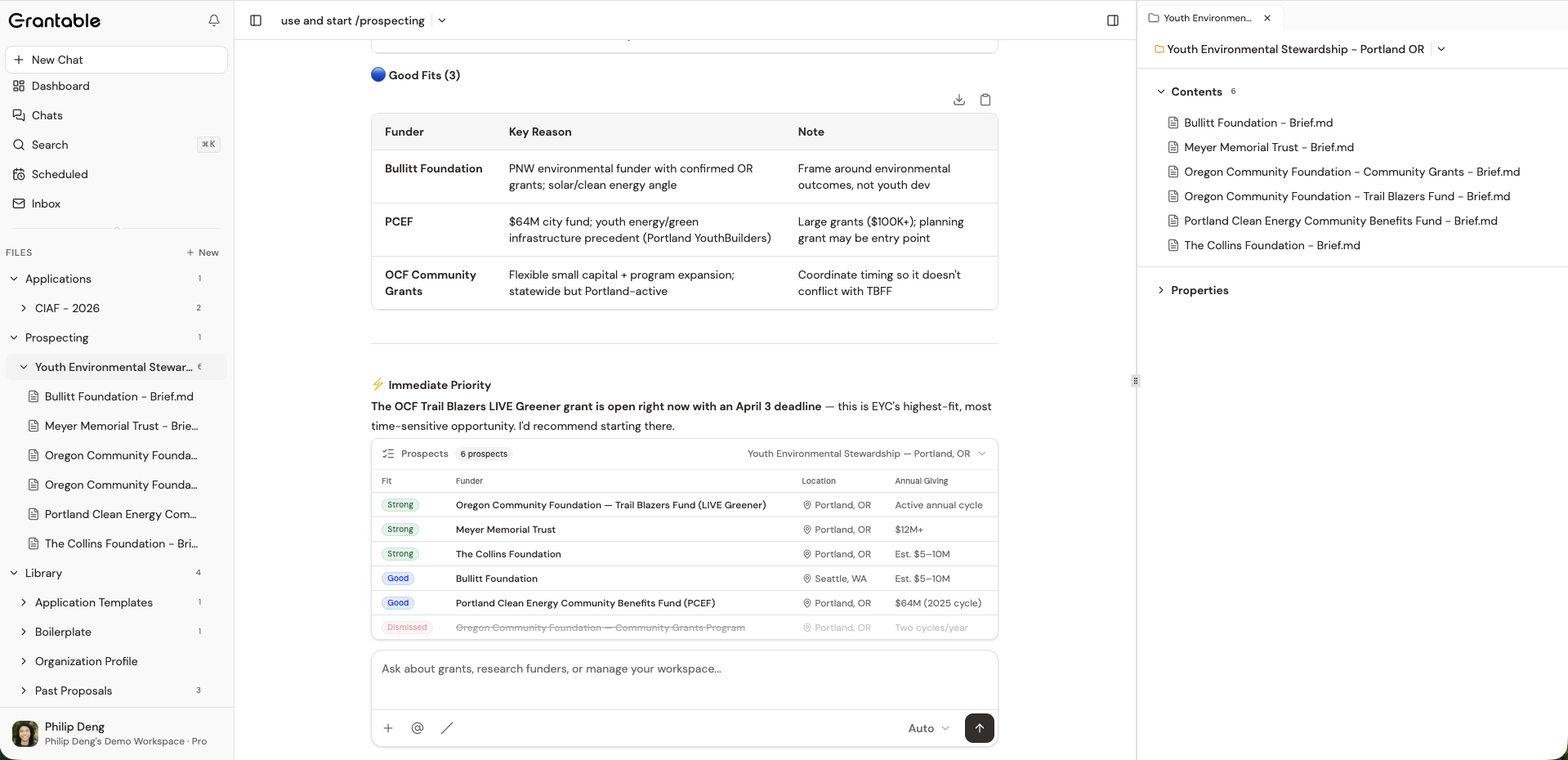
If the table comes back too broad, refine in chat: “Filter to funders who’ve made at least three grants in our county in the last two years.” If too narrow, broaden: “Include funders without explicit geographic restrictions but who’ve funded peer organizations.” Iterate until the shape is right before you start triaging individual rows.
Stage 2: Walk the prospect table top to bottom
Now triage. The table is already open in front of you. For each row, do one of two things:
- Accept if the funder looks promising. The row gets flagged; the AI learns from the pattern.
- Dismiss with a one-line reason if it’s a clear non-fit. “Out of geography.” “Too small a giving range.” “Funded a competing org last cycle.” The reason matters — it shapes the AI’s future suggestions and gives your team a record of why something was passed over.
For the maybes, leave the row alone and come back to it — an untriaged row stays in the table.
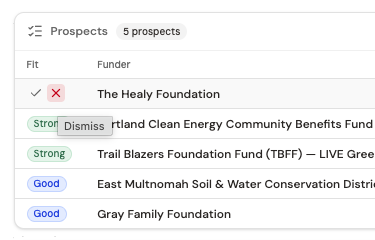
Plan to spend about 30 to 60 seconds per row. By the end of the table you’ll typically have 5 to 12 accepted prospects, a handful still untouched, and the rest dismissed.
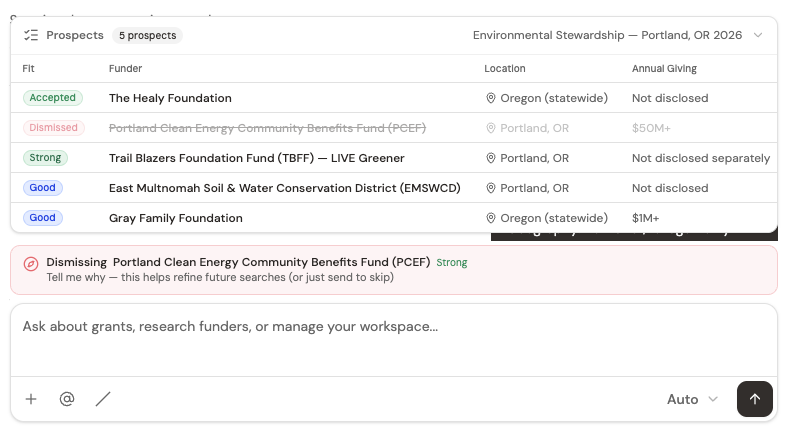
The triage isn’t just admin — it’s how the AI learns what your org actually wants. The next time you run /prospecting, the prior accepts and dismisses inform what gets surfaced first.
Stage 3: Generate Funder Profiles for the accepted prospects
For each accepted prospect, you want a Funder Profile — the institutional memory of that funder before you’ve ever spoken with them. Open a fresh chat (or the same one, doesn’t matter) and:
“/profile — generate a Funder Profile on [Funder Name].”
The /profile skill pulls 990-PF data, recent giving history, geographic patterns, peer grantees, and web research. It saves the result as a file in /Prospecting/[Funder Name] - Funder Profile - [Date].md.
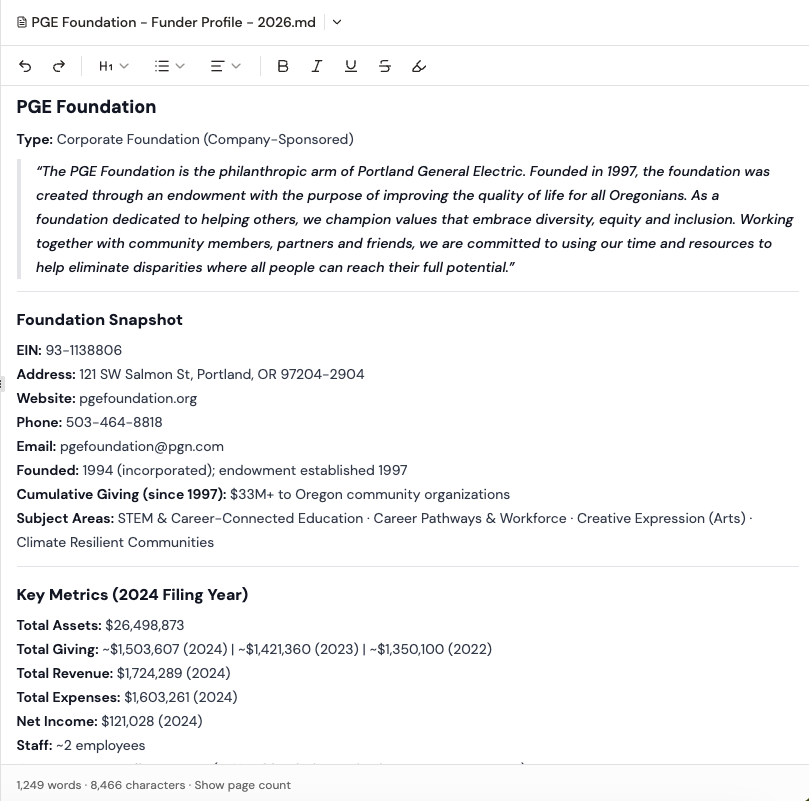
Read each profile. Edit any factual issues inline (the AI’s web research can be slightly out of date — fix dates, names, or grant amounts you know are wrong). Add a “Strategic Notes” section at the bottom for context the data doesn’t capture: “Strong relationship through Sarah at the Smith Foundation network.” “Last cycle they funded a competing org — we should consider a different angle.”
For five to seven accepted prospects, profiling all of them takes 20 to 30 minutes total. Run them sequentially or batch them.
You don’t have to profile every accepted prospect today. Profile the top three to five — the ones you’d actually pursue if their cycle opened tomorrow. Defer the rest until you have more capacity. Profiles are cheap to generate but earn their keep through depth, not volume.
Stage 4: Brief the strongest fits
Of the funders you profiled, two or three usually emerge as genuinely strong fits — based on what the profile surfaced about their giving patterns, sector focus, and current priorities. For those, generate a Grant Opportunity Brief:
“/grant-writing — generate a Grant Opportunity Brief for [Funder Name] based on their profile and our org. Include the Decision Matrix and a recommended approach.”
The brief turns “this funder seems aligned” into “here is exactly how we’d approach them, what they’d fund, and what we’d need to be ready to submit.”
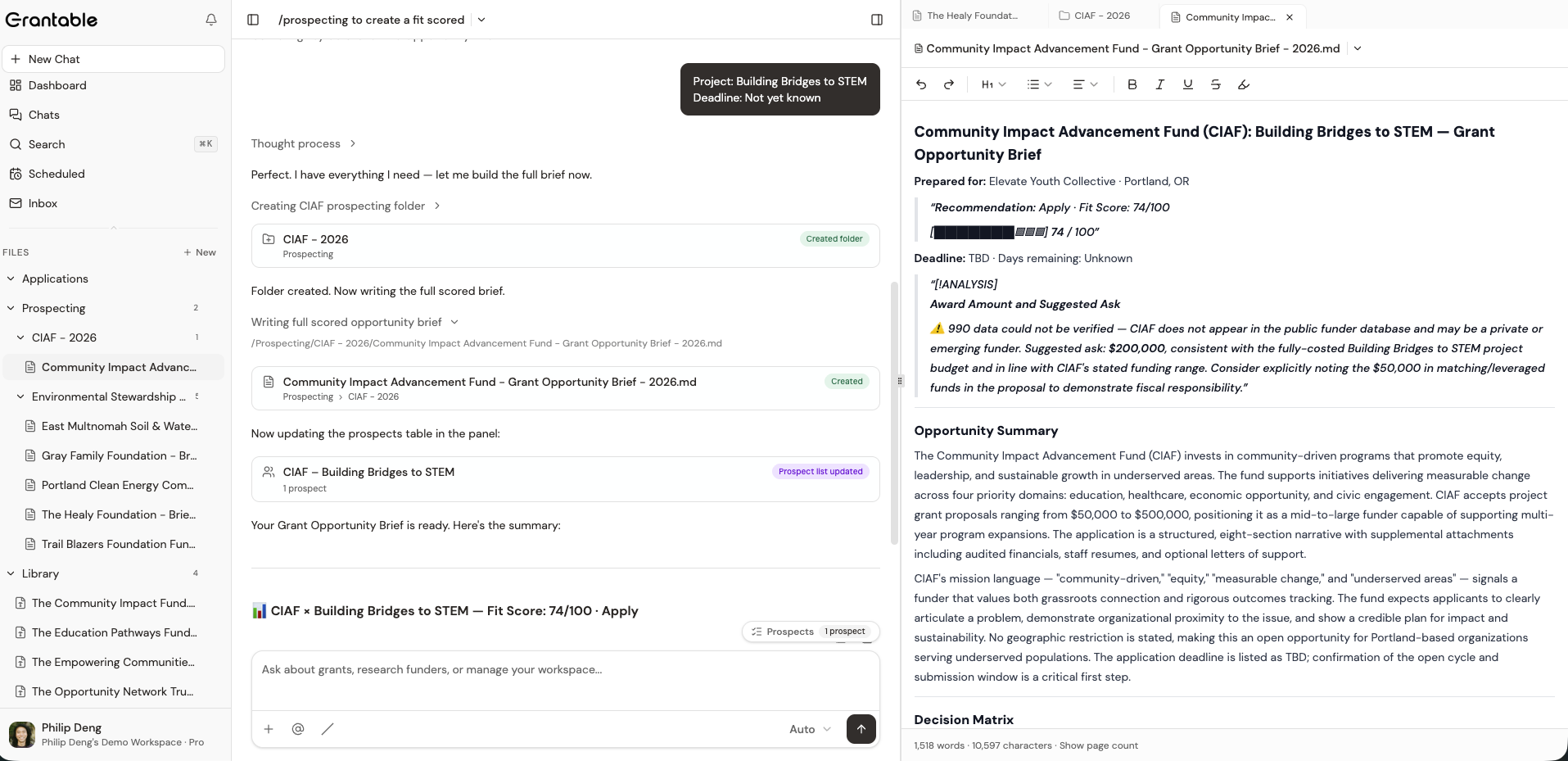
The brief is the artifact you share with leadership when you’re recommending pursuit, and it’s the artifact the AI references back to when an RFP from this funder eventually lands. What you put into it shapes what comes out later.
Stage 5: Set up monitoring so the RFP doesn’t slip past
Now wire the funders you care about into your monitoring. Two complementary tools:
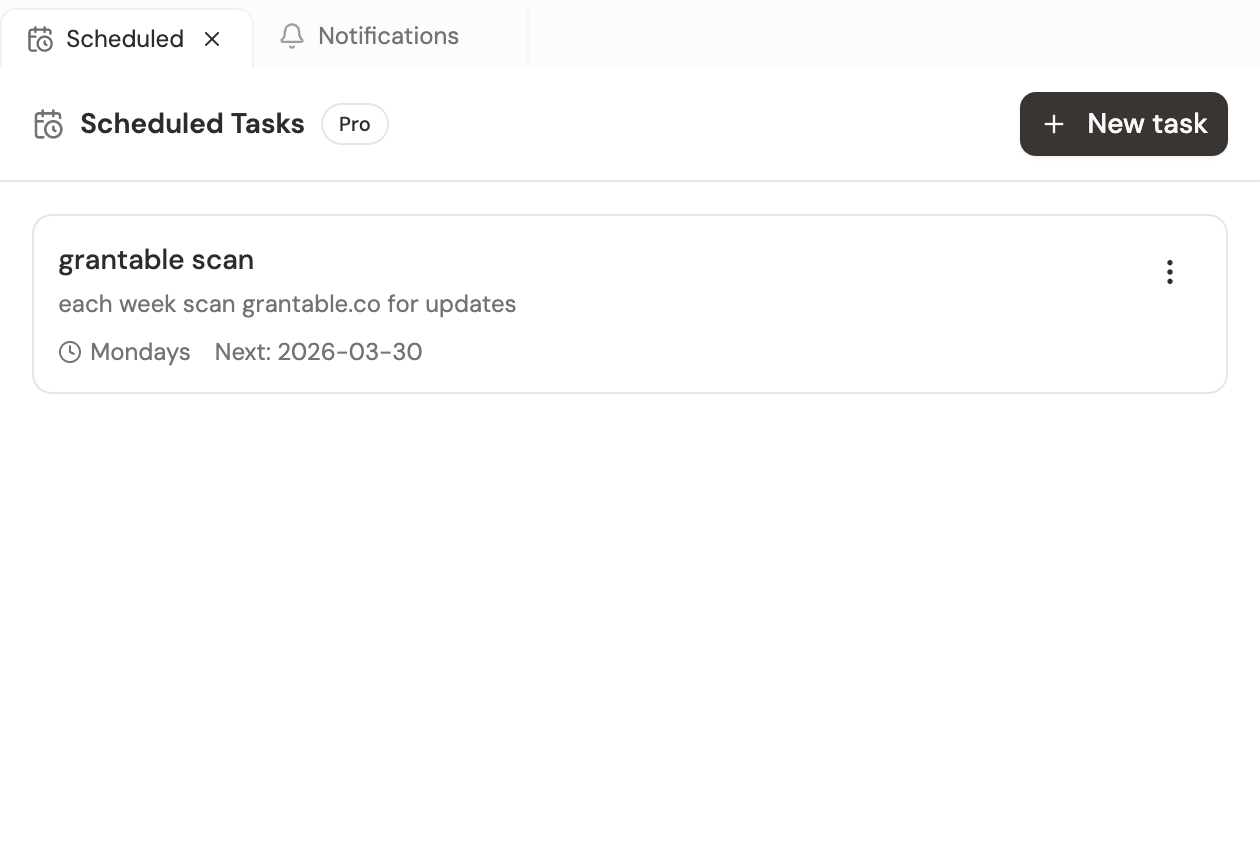
A scheduled task runs a recurring AI prompt on a daily, weekly, or monthly cadence. From the Scheduled Tasks panel, click + New task and write a recurring search like:
“Search the web for new RFP announcements, program changes, or grant calls from these funders in the past 7 days: [list of your top prospects]. Note anything new since the last run. If nothing changed, just say ‘no updates’ and stop.”
Set it to weekly. From now on, every Monday morning a new chat appears in your chat list with the week’s findings. Most weeks it’ll say “no updates” and you archive in two seconds. The week something opens, you know about it the same day.
Inbox subscriptions handle the funders that publish via newsletter. From your personal email, subscribe each funder’s mailing list using your [workspace-slug]@inbox.grantable.co address. New issues land in your workspace inbox where the AI classifies them and you can Send-to-Chat for analysis.
Together: scheduled tasks for proactive scanning, inbox subscriptions for what funders push directly. Both feed the same monitoring habit.
Stage 6: Log relationship moments as they happen
The intelligence you generate today has a half-life. Six months from now, the funder’s program officer may have changed, their funding priorities may have shifted, your org’s relationship with them may have evolved. The fix is small, recurring updates as things happen.
When something substantive occurs — a call with a program officer, a grantee announcement that’s relevant, a public statement of strategic direction — drop a line into the Funder Profile or the chat you used to generate it:
“Append to the [Funder] profile: ‘Spoke with Sarah Chen, program officer, on May 12. She mentioned the foundation is shifting toward more multi-year capacity grants in 2027. They’re particularly interested in measurable literacy outcomes.‘”
Two minutes of writing. Two years later, when the person who wrote it is no longer at your org, that note is the most valuable text in the workspace for whoever inherits the relationship.
Cadence over time
A proactive pipeline isn’t built once — it gets refreshed:
- Monthly: run
/prospectingagain with a fresh search. New funders enter the field; existing ones change priorities. The prospect table is a snapshot, and snapshots go stale. - Quarterly: revisit the Funder Profiles for your top 5 to 10 prospects. Update anything that’s changed. A profile that’s a year old is mostly still right — but the things that changed are exactly the things you need to know.
- Continuously: log relationship moments the day they happen. The discipline is doing it that day, not “when I have time later.”
The sustained cadence is what separates a one-time intelligence push from a real pipeline. It compounds: profile depth grows, relationship history accumulates, monitoring catches things faster.
A reactive operator runs a grant program. A proactive operator runs a grant strategy. The difference is whether the work happens during the deadline window or before it. Grantable compresses the deadline-window work enough that you have room for the proactive work — but only if you actually use the saved time that way, instead of taking on more reactive work to fill it.
You've identified five strong-fit funders during a discovery session. None of them currently have an open RFP. What's the highest-yield next step?
- Run /prospecting with a sharp, specific ask — geography, sector, scale, recency
- Triage the prospect table top to bottom: accept, dismiss-with-reason, or defer; the AI learns from the pattern
- Generate Funder Profiles for accepted prospects with /profile; add Strategic Notes for context the data can't capture
- Brief the strongest two or three with /grant-writing — these become the artifacts your team references when an RFP opens
- Set up monitoring: scheduled tasks for proactive scanning, inbox subscriptions for newsletter content
- Log relationship moments the day they happen — those notes are the most valuable text in the workspace two years later
Next Lesson
The first two lessons covered the two main lifecycles — one grant arriving, one pipeline being built. The next lesson zooms in on the daily rhythm: what to check in what order, and the 15-minute morning routine that keeps both surfaces honest.
Notice an error or have a question about this lesson?
Get in touchHave questions about this lesson?
Ask Grantable to explain concepts, suggest how they apply to your organization, or help you think through next steps.