The Grant Opportunity Brief
What a Grant Opportunity Brief delivers — recommendation, fit, gaps, question-by-question scaffolding — and how it turns a decision into a drafting kickoff.
- What a Brief Delivers
- The Question-Alignment Section
- How to Generate a Brief
- Using the Brief with Your Team
- Sharing Outside the Workspace
- Next Module
5 min
reading time
Interactive knowledge check
The Grant Opportunity Brief
An RFP drops. Somebody forwards it to the grants team. Somebody else prints it. Three people read it and come away with slightly different impressions of what the funder actually wants. A meeting gets scheduled to align, and the first real writing doesn’t happen for a week. That’s the old rhythm, and it’s where most grant teams lose the deadline to confusion more than to content.
A Grant Opportunity Brief collapses that week. It’s the document you generate once you’ve decided an opportunity is worth evaluating — and it turns an RFP packet into a shared, structured, writable picture of the work ahead.
What a Brief Delivers
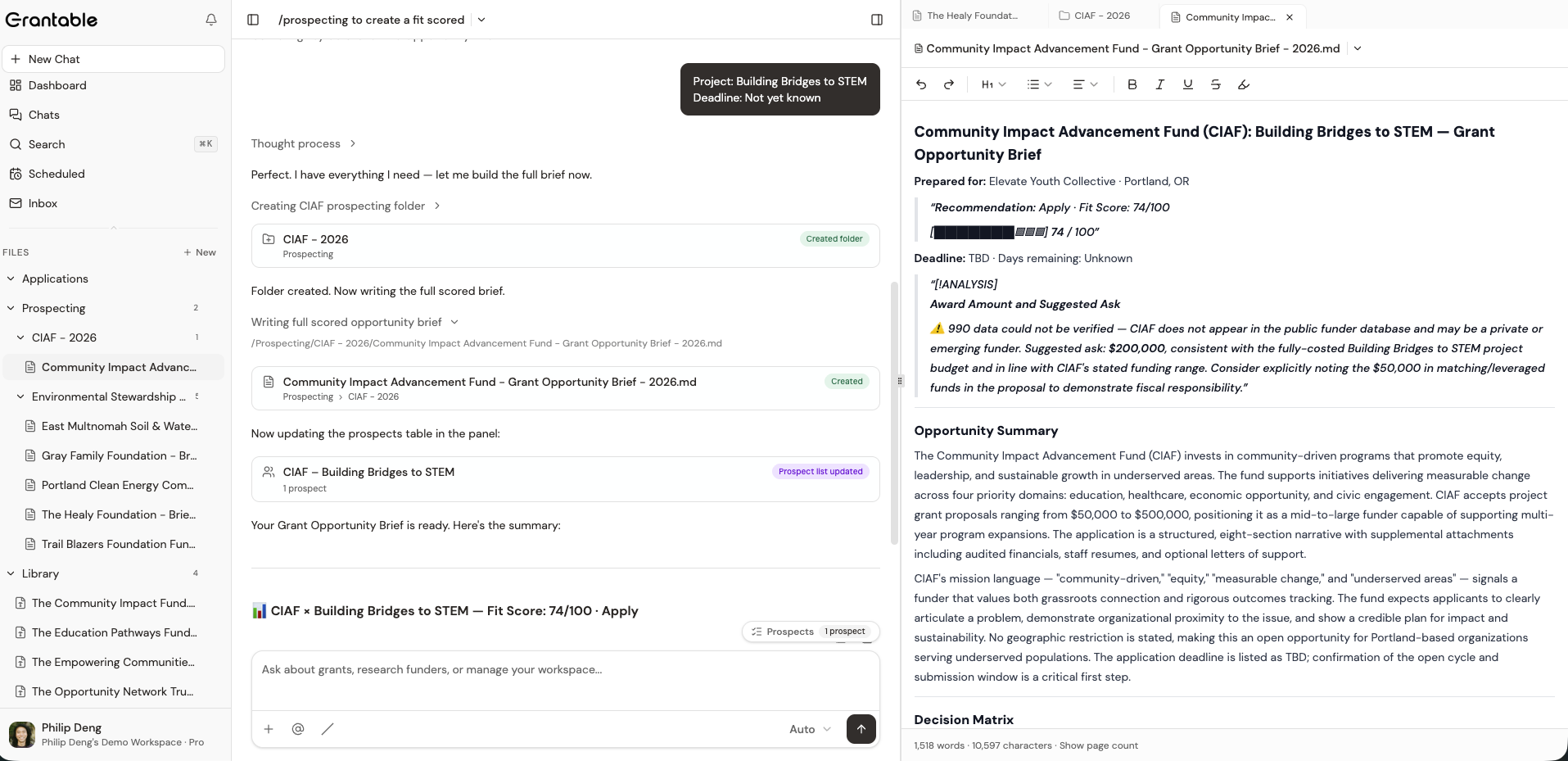
The header is the orientation — who the brief is prepared for, the funder and program, the award amount, and the deadline with days remaining. Everything a team lead needs in the first thirty seconds. The verdict itself — the Fit level — sits with the Decision Matrix, next to the evidence that produced it.
Below the header, the brief expands into the working material:
Opportunity Summary
Plain-English description of what the funder is funding, who's eligible, and how the program fits into the funder's broader strategy — drawn from the RFP plus 990-PF context.
Decision Matrix + Gap Analysis + Effort Estimate
The scored-dimensions section that supports the apply/pass call. Funder's Priorities, Credibility & Readiness, Effort & Timing — with a Why Apply narrative, a list of gaps to close before drafting, and a total effort estimate. Covered in detail in the previous lesson.
Application Requirements Inventory
The concrete proposal packet: narrative questions, budget and financial documents, supplemental attachments — each with format, requirement level, and what the RFP calls for. So nothing surfaces for the first time in the last 48 hours before submission.
Question-by-Question Alignment
Each RFP prompt with a word-count target, a recommended narrative angle, and the specific language from the RFP to mirror in your response. This is where an opportunity brief stops summarizing and starts scaffolding.
Recommended Next Steps
A short list of what to do in the next 48 hours — from scheduling an internal kickoff to requesting specific attachments from program staff. Turns the brief from a read-only document into an action list.
The Question-Alignment Section
This is the part of a brief most teams underuse. An RFP usually has four to eight narrative prompts; each has a word limit; each wants a specific story. The question-alignment section takes each prompt separately and tells you what to write toward.
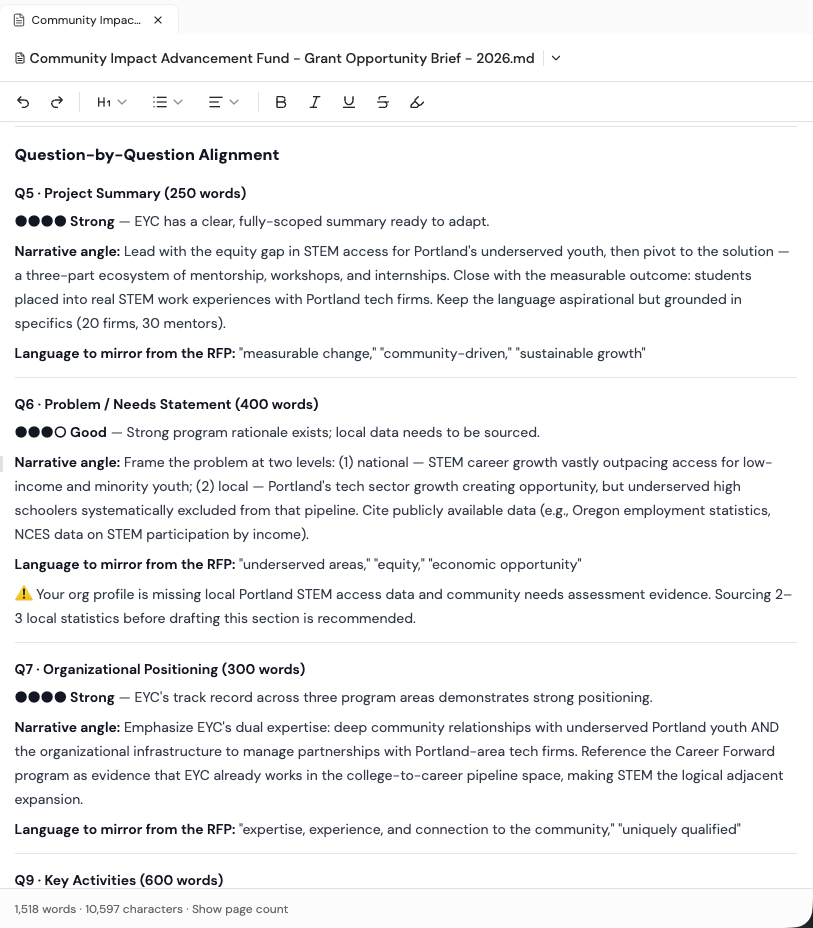
For every prompt you see:
- Word-count target — the exact budget for that answer
- Narrative angle — a recommendation for what this answer should accomplish given what the funder cares about
- RFP language to mirror — the specific phrases from the funder’s own language that your response should reflect
- Readiness chip — green if Grantable has the materials to draft immediately, gray if you’ll need to supply something first
The question-alignment section is the bridge between prospecting and writing. You’re not staring at an RFP wondering where to start — you’re looking at four or five writable chunks, each with a word budget, an angle, and the funder’s own language to mirror. The first draft begins there.
How to Generate a Brief
Opportunity briefs aren’t for every prospect. They’re for prospects you’ve already accepted and decided are worth a real evaluation, and for which you have a specific RFP or program in hand — the brief is scored and scaffolded against that specific opportunity, not the funder in general.
A brief is also only as sharp as what you give Grantable to work with. Two inputs have to be in place before the skill can produce something useful:
Organizational context in your Library
At minimum a populated /Library/Profile.md. Better still, recent proposals, annual reports, program descriptions, past letters of support. The brief is scaffolded against your actual programs and language — the more context in your Library, the more the brief sounds like your org, not a template.
The RFP in the conversation
Upload the RFP, paste the URL, or @mention a file you've already saved. Without the RFP, Grantable can describe the funder but can't align to specific narrative questions, word limits, or attachment requirements.
With those in place, invoke the /prospecting skill — either explicitly or by asking naturally:
“Create a Grant Opportunity Brief for the CIAF Building Bridges to STEM grant.”
“/prospecting — generate an opportunity brief for this RFP.” (with the RFP already in the conversation)
Briefs are produced by the same skill as funder searches; /prospecting recognizes “opportunity brief” and runs the right phase. If the funder already has a Prospect Brief in /Prospecting/{Search Vector}/, Grantable reads it for context; if not, it’ll do the groundwork first.
The template is yours to edit. Under the hood, the skill reads /Skills/prospecting/Grant Opportunity Brief.md as the output structure — the same editable file pattern as the Prospect Brief template. Open it to change which sections get generated, swap in a different scoring rubric, or add a section your team always wants. Future briefs follow your template.
Where the output lands: /Prospecting/{Search Vector Label}/{Funder} - {Program} - Opportunity Brief.md — same folder as the rest of your prospecting work on that search vector. A couple of minutes after you ask, the brief is a real file in your Library that the team can read, edit, and share.
Using the Brief with Your Team
The traditional kickoff meeting goes something like: “Okay, everyone, this is the RFP. Sarah, you take the narrative. Mike, financials. I’ll track the attachments. Questions?” A brief replaces most of that meeting with a document.
Share the brief first, meet second
Send the brief to the team 24–48 hours before the kickoff. By the time you meet, everyone's read the same summary, seen the same gaps, and is ready to discuss the actual work, not the setup.
Assign at the question level
The question-alignment section is the assignment board. 'Sarah, you take Q1 and Q2 — 400 words each, narrative angle is evidence-of-outcomes.' Concrete, scoped, word-budgeted.
Track readiness, not just progress
The readiness chips tell you where gaps exist before drafting begins. Closing gray chips into green chips is the team's first job.
Generate briefs for every accepted opportunity, even the ones you’re pretty sure you’ll pass on. A brief takes minutes to produce and forces the pass-or-pursue conversation to happen against a shared picture — not against whoever has the loudest memory of the RFP.
Sharing Outside the Workspace
Briefs are workspace documents, so anyone on your team can read and edit them. For people outside your workspace — a board member, a program director, a pro-bono advisor who needs to weigh in — you can share a brief by link without giving them full workspace access.
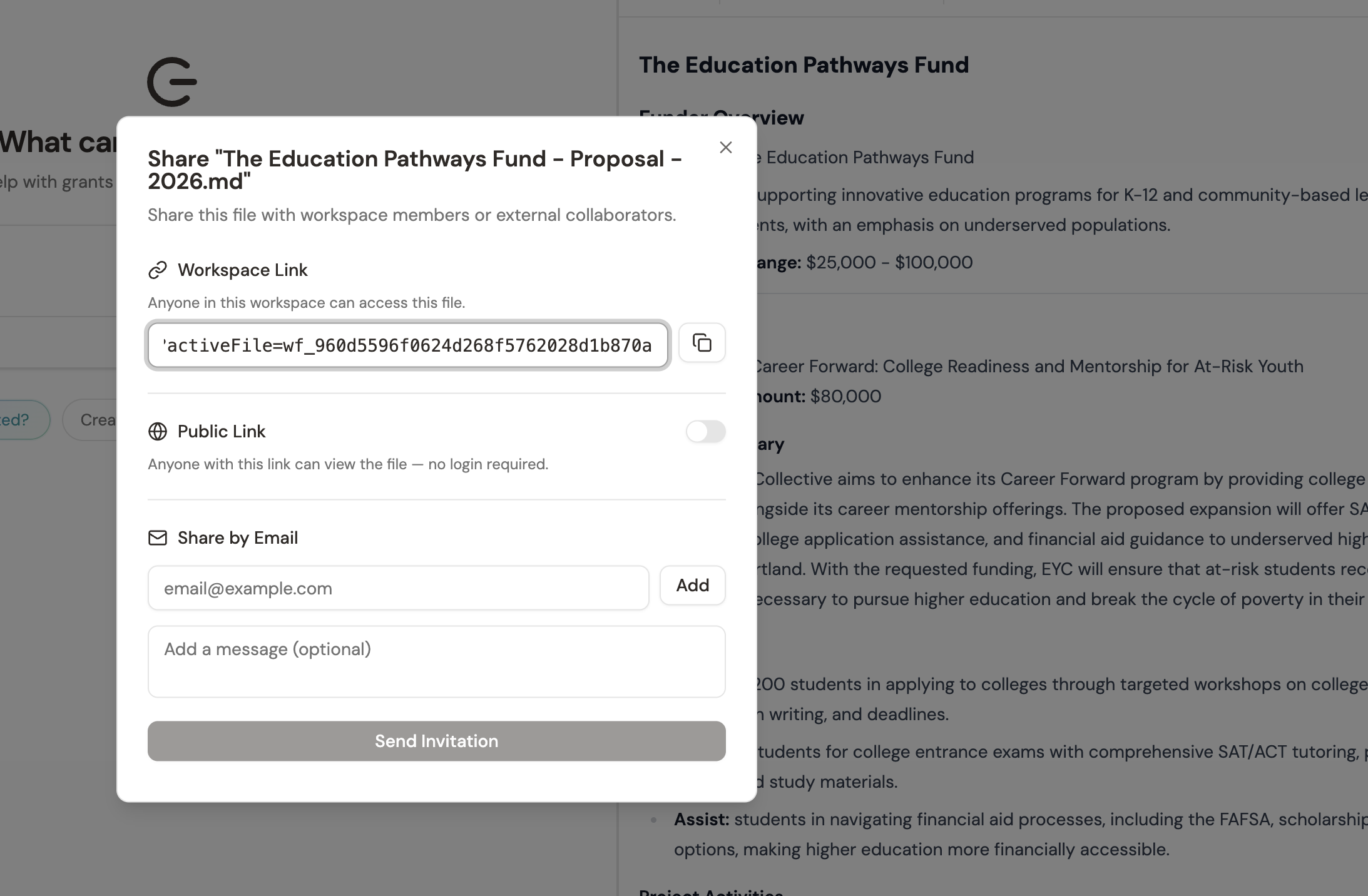
That’s how a brief ends up in a board meeting — as a shared link, not a PDF emailed the night before, and not a 30-minute verbal walkthrough of a funder the board doesn’t remember.
Your team just accepted three opportunities to pursue, with deadlines spread across the next eight weeks. What's the most useful first move?
- Grant Opportunity Briefs turn an RFP into a shared, decision-ready, writable document — header recommendation, opportunity summary, decision matrix, question-by-question alignment, and checklist
- The question-alignment section is the bridge from research to drafting — each RFP prompt gets a word count, narrative angle, and RFP language to mirror
- Generate briefs for accepted opportunities only (not every prospect); share them before the kickoff meeting, not during it
- Brief + shared link replaces the 'print the RFP and meet about it' kickoff ritual
Next Module
You’ve now mastered the full prospecting-to-decision arc — from a first funder search through GrantGraph matching, prospect tables, the Decision Matrix, and the Grant Opportunity Brief as a team document. Next module: Mastering Write. Taking an opportunity brief into a first draft, revising with Grantable as a co-writer, and shipping a proposal.
Notice an error or have a question about this lesson?
Get in touchHave questions about this lesson?
Ask Grantable to explain concepts, suggest how they apply to your organization, or help you think through next steps.