How GrantGraph Finds Funders
Why the funders in your results aren't keyword matches — and how to read a funder profile backed by 990 data.
- What GrantGraph Actually Does
- Reading a Funder Profile
- When a Match Surprises You
- Working with the Match, Not Against It
5 min
reading time
Interactive knowledge check
How GrantGraph Finds Funders
The hardest funders to find by searching are the ones that would actually give to you. Their websites describe broad priorities — “community development,” “healthy youth,” “economic opportunity” — that match a thousand organizations. What separates them from the hundred who’d say no is who they’ve actually funded. That pattern is invisible to a keyword search.
GrantGraph™ is built to see it. Instead of matching your org’s language to a funder’s language, it matches your org’s profile to the orgs each funder already supports.
What GrantGraph Actually Does
GrantGraph is a proprietary map of the giving relationships between funders and grantees, built from IRS 990-PF filings — 800,000+ organizations, refreshed monthly. Every filing reveals who a funder wrote checks to, when, and for how much. GrantGraph makes those relationships queryable.
Starts from your org, not a query
It builds a fingerprint of your organization — focus areas, geography, budget scale, populations served, mission — from your workspace profile. The richer your profile, the sharper the fingerprint.
Finds peer grantees
It scans the graph for organizations similar to yours. Not identical — similar enough that a funder of theirs would credibly consider you.
Walks the graph to their funders
Those peer grantees have funders. Those funders become your candidates. This is the 'who funds organizations like yours?' move that's nearly impossible to do by hand.
Funders’ 990 filings show what they actually do, not what they say they do. A foundation’s website might list “community development” as a priority; their 990 shows they’ve written 14 checks in the last three years, all to rural health clinics in Appalachia. That’s the signal GrantGraph surfaces.
Reading a Funder Profile
Once GrantGraph surfaces a match, the real work is reading the funder profile it generates. The profile pulls together what the 990 data actually says — so you can decide in minutes what used to take hours of PDF-digging.
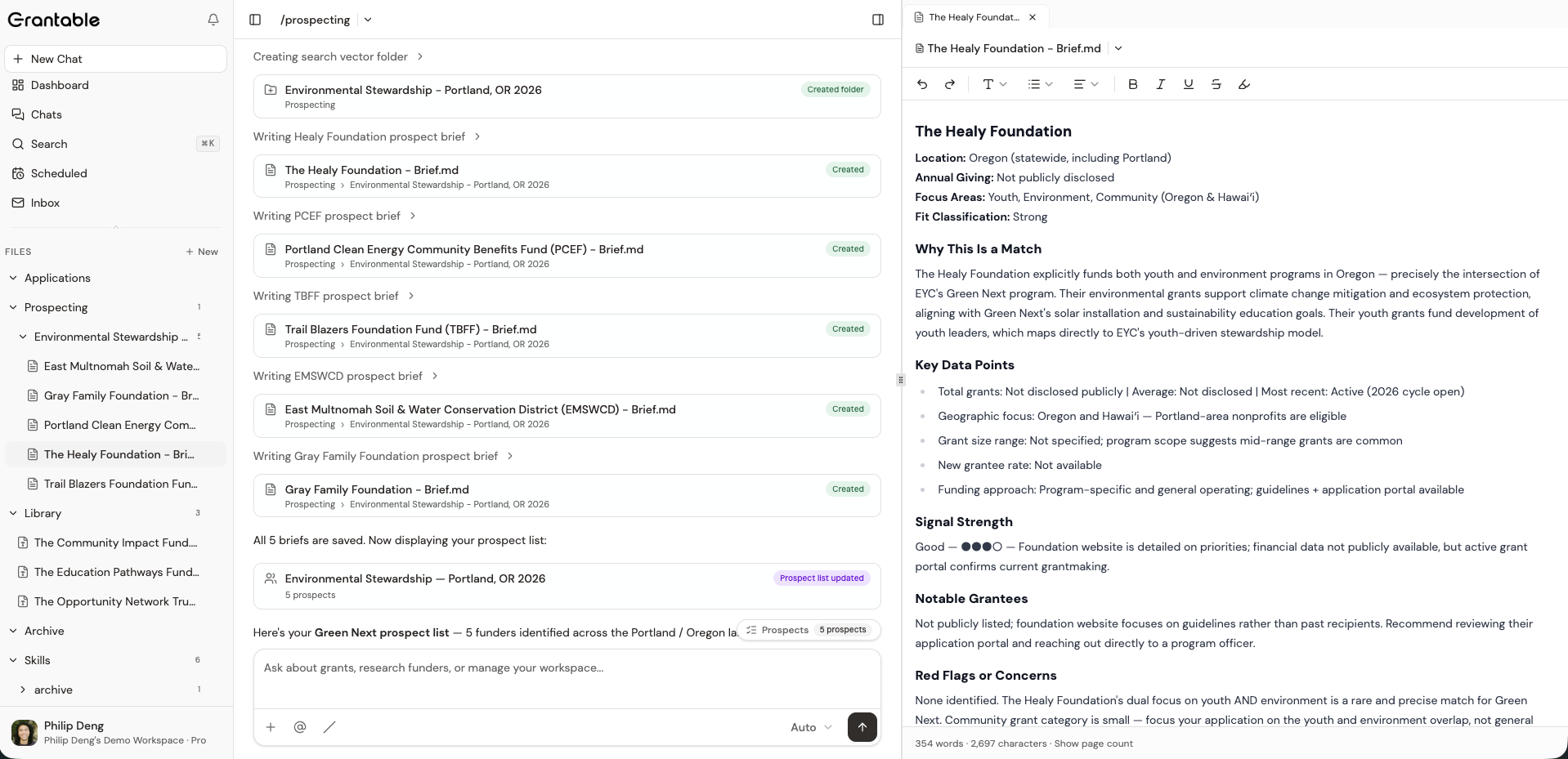
Four things to check first:
Is giving active and recent?
Look for grant activity in the last 1–2 years. A funder with no grants in three years probably isn't going to start with you.
Does grant size fit?
Check the typical grant range. If they give $250K and up and you're looking for $25K, the mismatch is real — either scale up the ask or move on.
Who are the notable grantees?
Look for organizations like yours — similar mission, similar size, similar geography. Peer grantees are the single strongest signal of fit.
Is the giving focused or scattered?
A funder who concentrates on a handful of program areas is easier to fit into. One that sprays grants across fifty causes is harder to read — the 'match' may be weaker than it looks.
When a Match Surprises You
Sometimes GrantGraph surfaces a funder you’ve never heard of, and your first instinct is skepticism. Lean into that — the profile tells you why it showed up.
Every match carries reasoning: “funds organizations in your geography working on adjacent focus areas,” or “has given to three peer organizations in the last two years.” Read that alongside the 990 data. If the reasoning holds up and the grant history backs it, the surprise match is often the best lead — a funder your peers already know about, that your network hasn’t brought up yet.
If the reasoning feels thin, dismiss it. The next search will know.
When you dismiss a prospect, Grantable captures the reason — geographic mismatch, wrong grant size, focus mismatch, deadline passed, or not a good fit. Future /prospecting runs read those dismiss reasons as context and weight the new search to avoid the same kinds of misses.
Working with the Match, Not Against It
Once a funder profile looks credible, the next step isn’t to go research them on their website from scratch. It’s to keep working with Grantable — on this funder, in the same conversation.
“Show me the three most recent grants Meyer Memorial Trust made to youth mentoring organizations. What did they give each for?”
“Does this funder have any language about program evaluation or outcomes reporting in their filings?”
“Compare this funder to [another in your shortlist] — which would be a better first ask for us?”
Grantable pulls from the same 990 data, the same graph, and the briefs it’s already written. The profile is a starting point you keep building on, not a static PDF.
Two funders appear in your results. Funder A's website lists 'community development' as a priority. Funder B's 990 shows fifteen grants in the last two years, all to youth programs in the Mountain West — which matches where your org works. Which signal should weight more in your decision to keep pursuing?
- GrantGraph matches by peer giving — 'who funds organizations like yours?' — not by keyword overlap
- IRS 990 filings are the ground truth; a funder's website describes aspiration, their 990 shows action
- Read funder profiles for: recent activity, grant size fit, peer grantees, focus concentration
- When you dismiss a prospect, give the reason — it shapes how future searches weight geography, grant size, or focus
Next Lesson
Matches coming in are just the start. Next we’ll look at the prospect table — how to organize a pipeline, compare funders side by side, and work your shortlist from strong leads to submitted applications.
Notice an error or have a question about this lesson?
Get in touchHave questions about this lesson?
Ask Grantable to explain concepts, suggest how they apply to your organization, or help you think through next steps.