The Daily Rhythm — A Walkthrough
Step-by-step: the 15-minute morning routine that keeps your inbox, your scheduled-task chats, and your dashboard honest — in a specific order, at a specific time.
- Before you start
- Stage 1: The inbox scan (5 minutes)
- Stage 2: Last night's scheduled-task chats (5 minutes)
- Stage 3: The dashboard calendar (5 minutes)
- Weekly add-on: pipeline review (15 minutes)
- Monthly add-on: prospect refresh (30 minutes)
- What goes wrong without this rhythm
6 min
reading time
Interactive knowledge check
The Daily Rhythm — A Walkthrough
Most grant teams’ relationship with their tools is “check when the anxiety hits.” A deadline lurks; somebody opens the dashboard for the first time in two weeks and discovers two applications due Friday. A funder emails on Monday; nobody sees it until the program officer calls Wednesday asking if they got it. Monitoring tasks pile up unread. The work is being done, but the system around the work isn’t being kept current.
The fix isn’t to check more often — it’s to check in a routine, in a specific order, at a specific time, every day. Fifteen minutes, performed first thing in the morning. This lesson is the walkthrough for that ritual: three surfaces, one short routine, designed so the system stays current as a side effect of habit instead of as a heroic Friday-afternoon catch-up.
Before you start
You’ll want:
- The inbox set up. Forwarded funder mail and subscribed newsletters are arriving at your workspace inbox (covered in M5L2).
- At least one scheduled task running. Even one is enough to make the second stage worthwhile (covered in M4L2).
- A pinned 15 minutes in your morning calendar, every weekday. Same time every day; the discipline is the consistency.
Stage 1: The inbox scan (5 minutes)
Open Grantable. From the right side of the app shell, open the Inbox panel (the mail icon in the right rail; or tap the keyboard shortcut you’ve assigned).
You’re looking at last night’s accumulation — funder newsletters, RFP announcements, deadline reminders, the occasional reply from a program officer, plus whatever noise made it through. Each item is already classified by the AI: Opportunity, Deadline, Correspondence, Newsletter, or Noise.
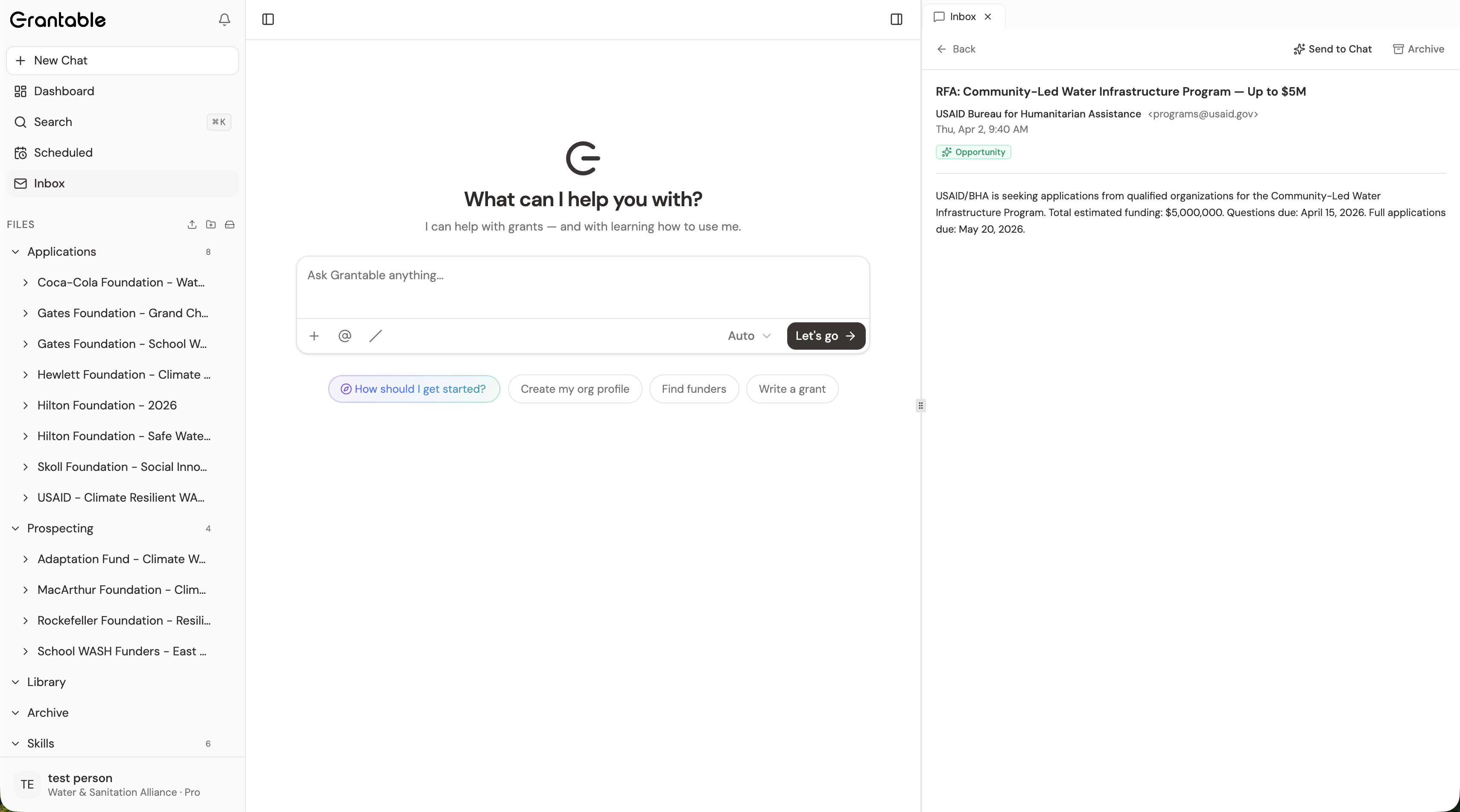
Scan in this order:
- Opportunities first. For each one that looks promising, click into the message. If it’s clearly worth analyzing, click Send to Chat — the email and any attachments queue into a fresh chat. Type a quick prompt like “Evaluate fit against our profile.” You’ll come back to read the analysis later in dedicated work time; for now you’ve routed it.
- Deadlines second. Reporting reminders, renewal notices. If the deadline is real, make sure it’s in your dashboard with the right date. If you’re not sure, route to the right teammate via @mention on the inbox item.
- Correspondence third. Replies from program officers, internal threads, anything conversational. Read; route or respond as needed.
- Newsletters fourth. Skim subjects only. If something genuinely surfaces, Send to Chat. If nothing changed, archive.
- Noise — archive without reading.
The whole pass should take five minutes. You’re triaging, not resolving. Anything that needs more than two minutes goes onto the day’s work plan as a discrete task; the rest is filed or routed.
Resist the impulse to start working on what surfaces in real time. The morning routine is for triage. If you start drafting a funder reply at 9:05am, the rest of the routine doesn’t happen and the dashboard stays stale. Triage now, work later.
Stage 2: Last night’s scheduled-task chats (5 minutes)
Open the chat list in the sidebar (left side of the app shell). Look for new chats that appeared overnight — these are the results of any scheduled tasks running on your behalf. The chat title usually reflects the task name (e.g. “Weekly funder landscape scan”) and the timestamp tells you when it ran.
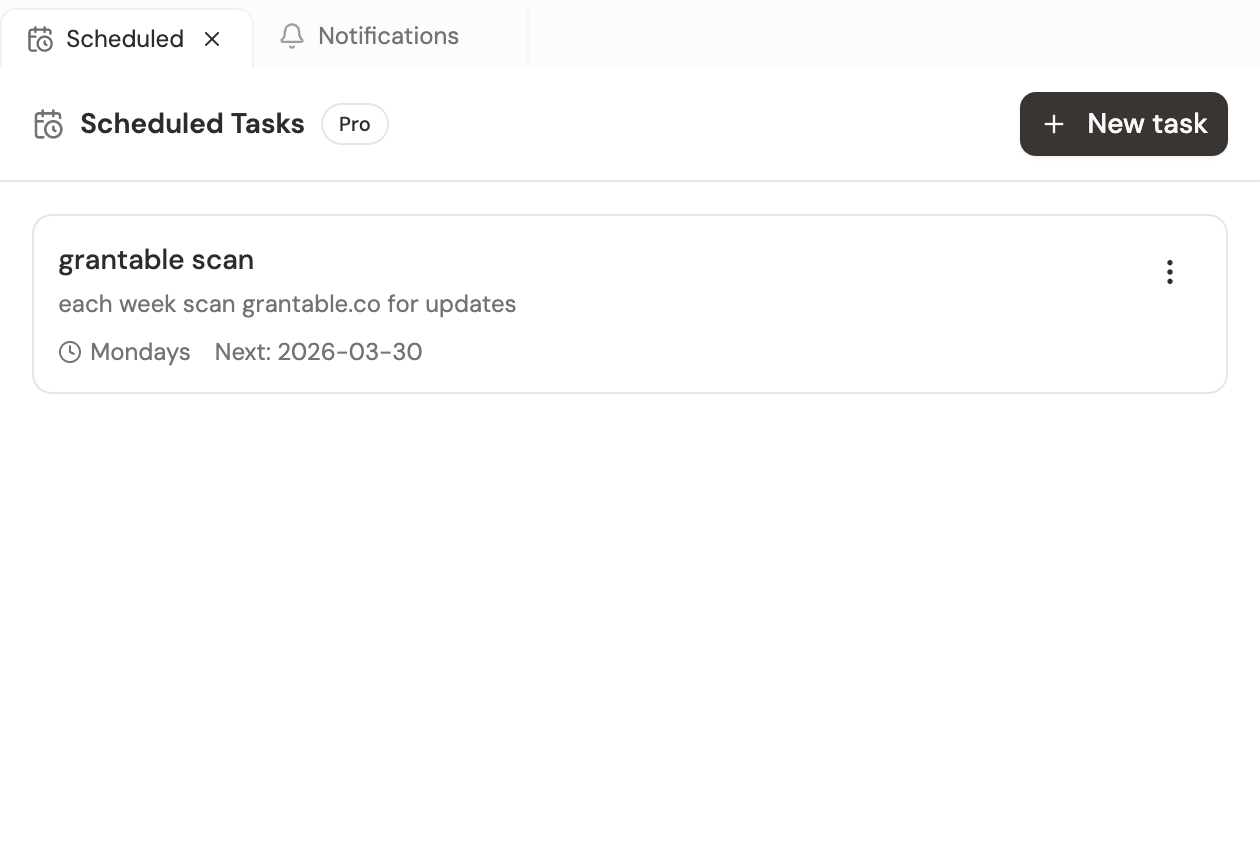
For each new chat:
- Open it; read the result.
- If it says “no updates” or surfaces nothing actionable, archive the chat or just leave it (it’ll fall off the recent list naturally).
- If it surfaces something real — a new RFP from a funder you’re tracking, a relevant news mention, a program officer change — that becomes the seed of the day’s work. Either start a follow-up chat (“Read this RFP and evaluate fit”) or route it to the right teammate.
Most weeks, most overnight chats will be quiet. The one or two that aren’t are why the routine exists.
Stage 3: The dashboard calendar (5 minutes)
Open the dashboard. Switch to calendar view. Look at the next 30 days.
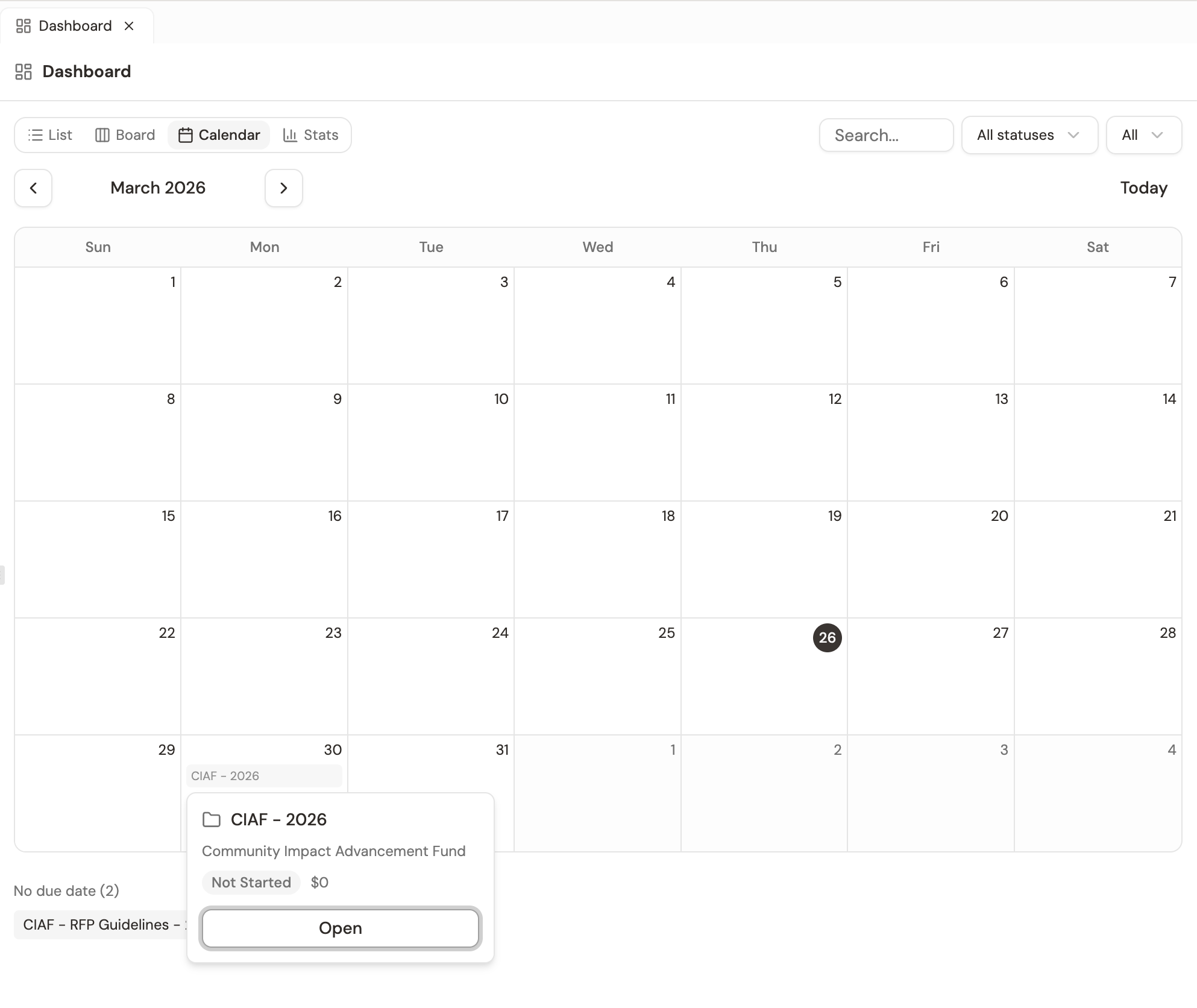
Three things to scan for:
- Anything due this week? If yes, is the work tracking on schedule, or do you need to reprioritize today?
- Any deadline clusters? Three submissions in one week is a planning problem, not a Friday-afternoon problem. The calendar surfaces them while you can still act.
- Anything looking stale? A grant marked “in_progress” with a deadline three days away that hasn’t been touched in a week is a flag. Either restart the work today or have an honest conversation about whether to withdraw.
End the routine looking at the strategic frame, not the inbox-zero frame. You walk into the day knowing what’s on the calendar and what’s catching up — instead of reactively responding to whatever email surfaced.
Set a 15-minute timer at the start of the routine. When it goes off, you stop scanning even if you haven’t finished. The point is to triage, not to resolve. If something’s important enough to need more than the allotted time, it’s important enough to be its own dedicated work block later in the day.
Weekly add-on: pipeline review (15 minutes)
Once a week — same day, same time, ideally before the team meeting — open the dashboard’s kanban view and walk it left to right.
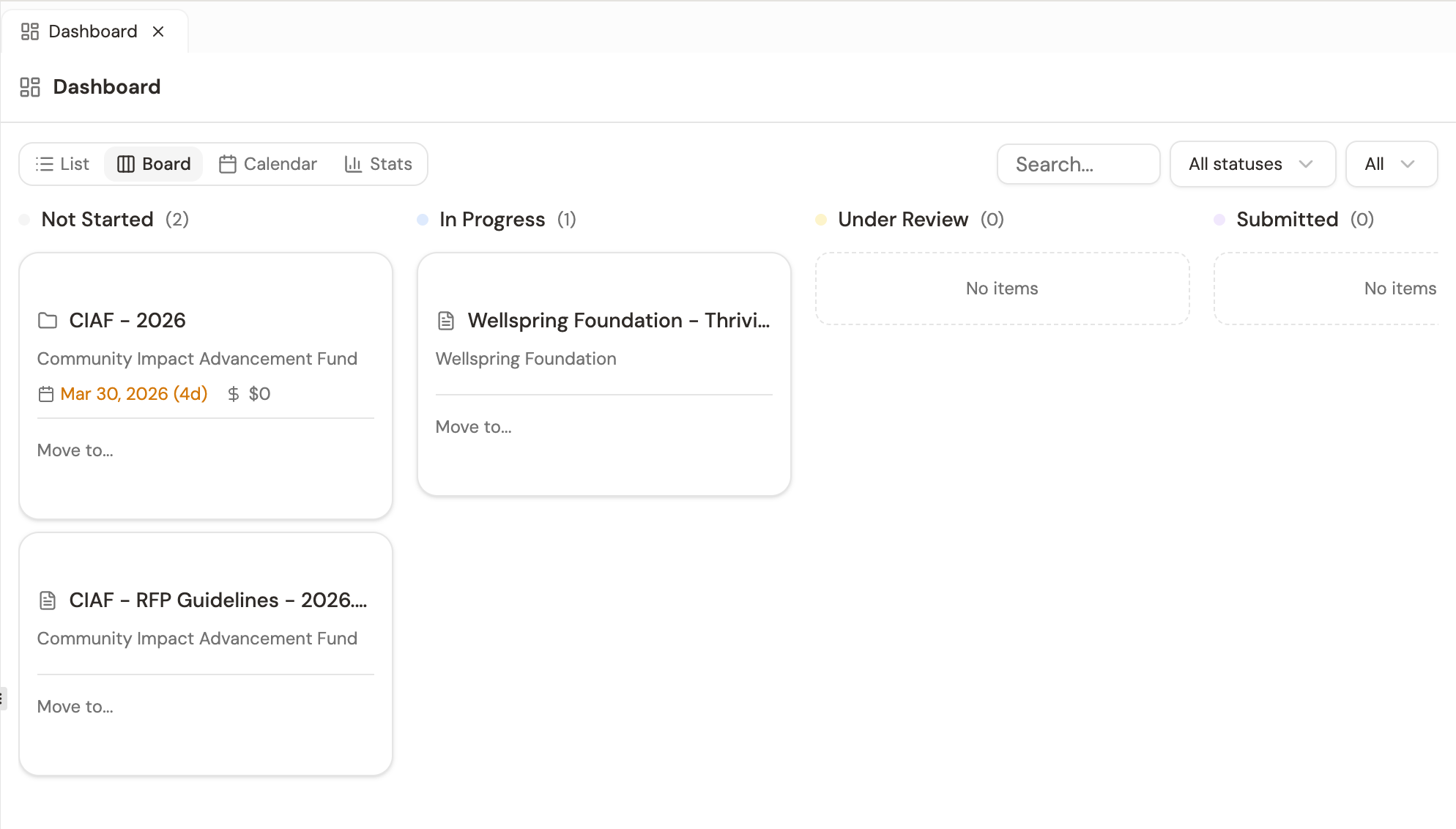
Each column represents a stage. Walk top to bottom:
- Not Started: Anything that should have moved by now? If a prospect’s been sitting in this column for a month, decide — pursue, defer, or dismiss.
- In Progress: What’s the actual progress? Sections drafted, sections still pending, blockers from team or funder.
- Under Review: Who has the draft, when do you need it back? Nudge if it’s been more than 48 hours.
- Submitted: Are responses tracking on time? Anything past expected response date that needs a follow-up email?
- Awarded / Declined: Anything new this week? Capture the lesson — “Won — they liked the partnership framing.” “Declined — fit was real but our financials looked thin.” — directly on the application file.
End-of-week pre-empts a Monday-morning panic. Fifteen minutes weekly; pick the day and stick to it.
Monthly add-on: prospect refresh (30 minutes)
Once a month, run /prospecting with a fresh search (covered in detail in L2). New funders enter the field; existing ones change priorities. The prospect table goes stale; this is the routine that keeps it current.
The other monthly task: walk your existing Funder Profiles for the top three to five prospects and refresh anything that’s changed. A profile is a snapshot, and the value compounds when the snapshots stay current.
What goes wrong without this rhythm
Two failure modes worth naming:
- No routine. You check when you remember; the overnight chats pile up unread; the dashboard goes stale. Eventually you spend an hour reconciling instead of fifteen minutes scanning. The system was watching for you, but no one was watching the system.
- Routine without exit criteria. The morning routine expands into “respond to every email and chat in real time.” That’s not the routine — that’s getting captured by the inbox. The routine triages and routes; the actual response work happens in dedicated blocks afterward, on the work you decided in triage was worth doing.
The system is designed to do most of the watching for you — classify your email, scan the funder landscape on a schedule, flag deadlines as they approach. Your job inside that system isn’t to keep watch; it’s to apply judgment to what surfaces. Fifteen minutes a day, in order, is the price of the system staying useful.
It's 9am Monday. You haven't opened Grantable in three days because of a long weekend. What's the right reentry sequence?
- 15-minute daily routine, every weekday morning at the same time: inbox (5) → overnight chats from scheduled tasks (5) → dashboard calendar (5)
- Order matters: triage urgent first, monitoring second, strategic last — finish with the frame, not the noise
- Triage routes; it doesn't resolve. Real response work happens in dedicated blocks afterward on the items you chose to escalate
- Weekly: pipeline review with the kanban view (15 minutes). Monthly: prospect refresh with /prospecting (30 minutes)
- The system is watching for you — your job is to apply judgment to what surfaces, not to keep watch yourself
Next Lesson
The daily rhythm keeps the system useful in the moment. The next lesson is about what the system becomes over time — the structural choices and quarterly rituals that keep a two-year-old workspace easier to use than a fresh one.
Notice an error or have a question about this lesson?
Get in touchHave questions about this lesson?
Ask Grantable to explain concepts, suggest how they apply to your organization, or help you think through next steps.