Working the Prospect Table
How to triage a prospect table into a real shortlist — live-ness, record completeness vs. Fit, briefs, the triage card, accept/dismiss, and the conversational moves that narrow a long list down.
- What You See at a Glance
- Reading Before Deciding
- One Funder at a Time
- Accept, Dismiss, and Why It Matters
- Working the Table Conversationally
7 min
reading time
Interactive knowledge check
Working the Prospect Table
A prospecting search gives you a ranked shortlist. What it doesn’t give you is a decision. The prospect table is where you make one — scanning the candidates, reading what Grantable wrote about each, and narrowing a long list into the two or three funders actually worth going after.
It’s a triage surface. Not a spreadsheet you live in, not a database you maintain — a quick working view that gets you from “here are the matches” to “here’s who we’re pursuing” in one pass.
What You See at a Glance
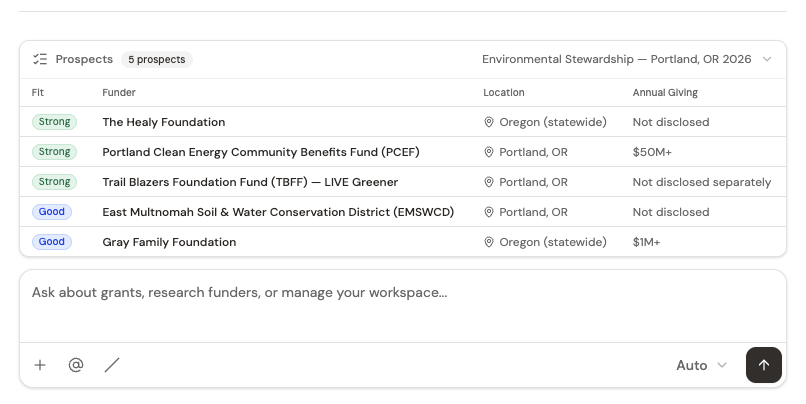
Every row is one funder. At the table level, you see:
Live-ness rail
The thin colored bar at the far left of each row — Open now, Between cycles, or Filing data only. It answers the first question worth asking: is this funder demonstrably still giving, or are we reading a tax filing from three years ago? Hover it for the evidence behind the call.
Fit column
Before you ask for an assessment it reads Not assessed. After an assessment it becomes a real Fit token, and it is always one word: Strong, Fair, Weak, or Blocked. Hover it for the caption behind the call — which dimension bound the verdict, or why it is blocked. If the assessment ran but the funder material was too thin to call either way, it says so: Assessed — inconclusive. How much Grantable actually knows about the funder is a different question, and it lives in the Prospect Brief rather than on the row.
Funder name
The organization. Clicking the row opens its Prospect Brief in the context panel so you can read Grantable's full write-up on why it's a match.
Location
Geographic base and scope — tells you at a glance whether geography is likely to be a match without opening the brief.
Annual giving
Scale of the funder's activity. A funder giving $50M+ a year operates differently than one giving $1M. Both can be good fits, but the approach is different.
The label at the top is the search vector — the descriptive name of the folder this shortlist was saved into (“Environmental Stewardship — Portland, OR 2026” in the screenshot). You can return to that folder anytime, rerun the search, or schedule it to refresh.
Reading Before Deciding
The table is the entry point; the Prospect Brief is where the decision actually gets made. Click any row and the brief opens beside the conversation — Why This Is a Match, Key Data Points from 990 filings, How Much We Know About This Funder, Notable Grantees, Sources, and a Your Notes section that is yours alone. One or two minutes of reading per brief is usually enough to know whether a funder is worth deeper attention.
There’s no separate “red flags” section. A real concern — a geographic edge case, a narrow focus, declining giving — is named inside Why This Is a Match, where it belongs: a concern is part of the match assessment, not a verdict of its own.
How Much We Know About This Funder is the question the table deliberately leaves alone. It opens with a level — Excellent through Poor — and it measures how complete the funder record is, not how well you match. Then it names what is missing, what would fill each gap, and what it costs you to leave it there. That is a different question from fit, and it gets prose rather than a badge because the answer is never one word.
A freshly written brief carries no fit verdict. It is written before anything has scored the funder against your organization, so a label in the file would only be a guess. The prose tells you why it might be a match; the verdict waits for the assessment. Once you do assess the funder, Grantable writes a Fit Assessment section into that same brief — the verdict and the six dimensions behind it — so the table and the document never disagree.
Don’t agonize over a first pass. If a brief doesn’t earn your interest in two minutes, dismiss it. The ones that stop you — because the grantees look like peers, or the giving pattern fits, or a program area surprises you in a good way — are the ones to accept and go deeper on.
One Funder at a Time
The prospect panel opens as soon as Grantable builds the slate, and a triage card sits above the table, showing a single funder at a time: its live-ness rail, the one line of evidence behind that call, location, its Fit token (or Not assessed), the ask, and the deadline if there is one. The queue orders itself — live funders first, then the nearest deadline — so the card in front of you is the one most worth a decision. The header keeps score — “Triage · 6 left” — and carries a running In pipeline total of what you’ve committed to so far, which you can click through to the dashboard.
Three verdicts, each with a keyboard shortcut so you can work the deck without reaching for the mouse:
Go (G)
You're pursuing this one. It moves into your pipeline and its ask joins the running total in the header.
Save for Later (S)
Interesting, not now. It's accepted onto your list as something you're watching rather than working, so it stays out of the pipeline total.
Dismiss (D)
Off the list — the same verdict as the ✕ on a table row. It leaves the funnel entirely, so its ask drops back out of the total.
Changed your mind? Undo (U) puts the last card back. When the deck runs out, the tile collapses to a single line — “12 triaged · 4 to pursue · 3 watching · 5 dismissed” — rather than a pile of confirmations.
The card is the fast path and the table is the reference view; they’re the same data. Triage the deck when you want to get through a list, and drop back to the table when you want to compare rows side by side.
Accept, Dismiss, and Why It Matters
You can also work straight from the table. Hover over a row and the Fit column swaps to a pair of action buttons — a green check to Accept and a red × to Dismiss.
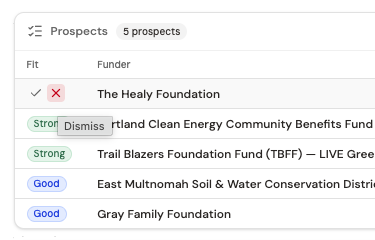
The two moves are intentionally light-touch:
- Accept — the same verdict as Go on the triage card. It moves the funder to your active shortlist, so Grantable can build opportunity briefs for it, include it in fit assessments, and reference it when you ask questions across your pipeline. A green tag appears beside the funder’s name naming its own pipeline stage — Watching to begin with — rather than a fixed word like “Accepted,” so the tag never disagrees with what the dashboard calls the same row. Save for Later writes the same kind of tag, with Watching as its stage too. The Fit column itself is untouched — it keeps answering the question its header asks.
- Dismiss — removes the funder from active consideration. The row stays visible but struck through and dimmed — no separate tag, since the strikethrough already tells the story — and Grantable opens a small reason prompt in chat: “Tell me why — this helps refine future searches (or just send to skip).”
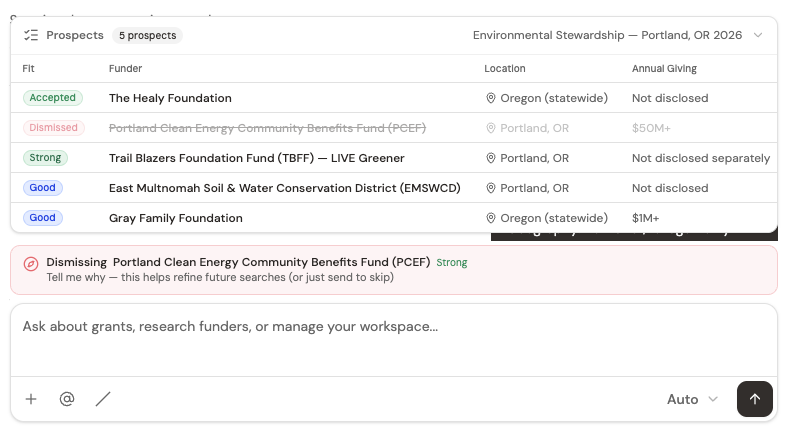
You can answer in a sentence — “wrong grant size,” “geography’s off for us,” “already applied in 2024” — or skip. What you tell Grantable about a dismiss is what it carries into the next search. Funders similar to the one you rejected get deprioritized; your original reasoning shapes the re-ranking.
Dismissing with a specific reason is how you train future searches. If your dismiss history shows you repeatedly turn down funders for geographic reasons, the next /prospecting run weights geography more heavily. A silent dismiss is a wasted signal — the prompt is there for a reason.
Working the Table Conversationally
The table isn’t the only way to work a shortlist. You can keep the conversation going and ask Grantable about specific prospects, or across the whole table:
“Which two of these have the strongest recent giving to organizations our size?”
“Compare Healy Foundation and Gray Family Foundation — which is a better first ask?”
“Dismiss the ones that don’t fund programs with multi-year commitments.”
Grantable can read the briefs it just wrote, pull additional 990 data, and act on the table directly — running a fit assessment, dismissing rows, or surfacing details you’d otherwise have to hunt for.
You have a prospect table with eight funders and none of them has been assessed yet. What's the most efficient first pass?
- The prospect table is a triage surface — scan the live-ness rail, click rows to read the briefs, decide which to pursue
- Before an assessment the Fit column reads Not assessed with a data-completeness chip beside it; a Strong / Fair / Weak / Blocked Fit token appears only after you ask Grantable to assess
- The triage card works the same list one funder at a time — Go, Save for Later, Dismiss, with Undo and keyboard shortcuts
- Accept builds your active shortlist; dismiss with a reason shapes future searches
- You can work the table conversationally — ask Grantable to compare funders, dismiss in bulk, or surface specific details without leaving chat
Next Lesson
Once your shortlist is narrowed to the funders you actually want to evaluate, Grantable can produce a Grant Opportunity Brief for a specific RFP. Inside that brief lives the Decision Matrix — where the apply/pass call gets scored, gaps get listed, and effort gets estimated. That’s next.
Notice an error or have a question about this lesson?
Get in touchHave questions about this lesson?
Ask Grantable to explain concepts, suggest how they apply to your organization, or help you think through next steps.