Welcome to Grantable
What Grantable does, who it's for, and how to get the most out of the platform.
Last updated Mar 26, 2026
You already know how this works
If you’ve used ChatGPT, Claude, or any AI chat tool, you already know 80% of how Grantable works. You type, it responds. The difference is what’s behind the conversation.
Most grant teams cobble together a stack of disconnected tools — an AI chatbot for drafting, a word processor for editing, spreadsheets for tracking deadlines, database subscriptions for finding funders, and maybe a project management app to hold it all together. You copy-paste between them. You re-explain your organization to every new tool. Nothing talks to anything else.
Grantable replaces that entire stack with one workspace. The AI already knows your organization, your files, and the funders you’re pursuing — so you spend less time managing tools and more time on the work that actually wins grants.
Who is Grantable for?
Nonprofit teams — You’re wearing five hats and need to move fast. Grantable handles funder research, proposal drafting, and file management in one place so you can stop juggling tabs.
Grant consultants — Scale your practice without scaling your hours. Work across multiple clients, each with their own workspace, and let AI handle the first draft.
Large organizations — National orgs and umbrella networks with complex operations, multiple chapters, and nine-figure budgets use Grantable to bring structure to grant work at scale.
Small businesses and startups — Pursuing SBIR, STTR, or private grants without dedicated grant staff? Grantable gives you a grant team in a chat window.
Universities and researchers — Draft narratives, manage supporting documents, and navigate the specific requirements of federal and foundation funding — without the learning curve of enterprise grant software.
The two-panel workspace
Here’s the mental model: Grantable is two panels side by side, and that’s basically the whole product.
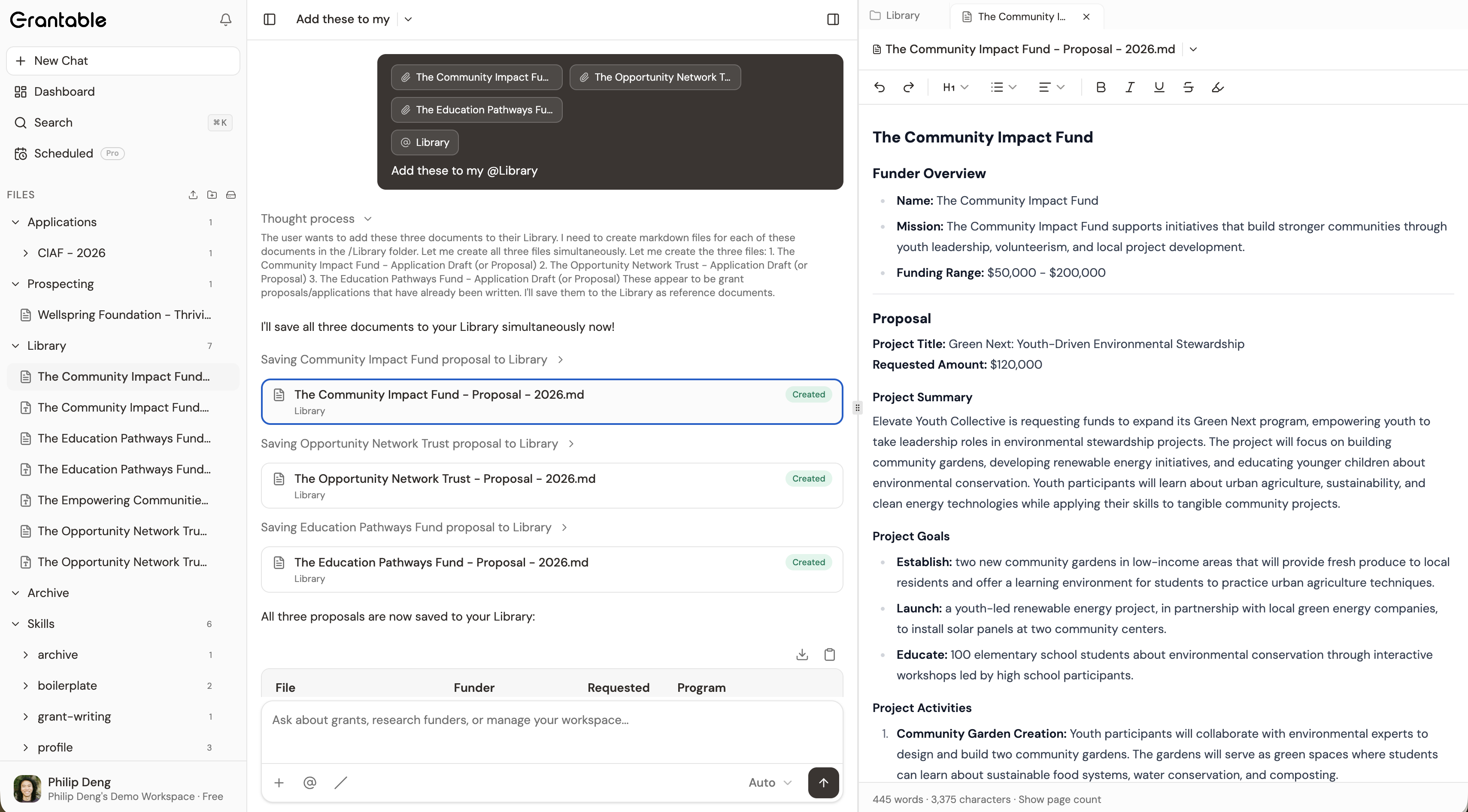
On the left, the chat. This is where you do most of your work. Ask Grantable to find funders, draft a proposal section, review a document, summarize a grant opportunity, or manage your pipeline. The AI has full context on your organization, your uploaded files, and the funders you’re tracking — so you don’t have to re-explain anything.
On the right, the context panel. This is your workspace for files and documents. Browse your file tree, open and edit documents, create folders, organize source materials. Everything the AI can do with your files, you can do directly here too.
The two panels work together. You can talk to the AI about a document while you’re reading it. Ask the AI to create a file and watch it appear in your file tree. Drag a PDF into the chat and ask for a summary. It’s one workspace, not two tools duct-taped together.
That’s it. No complex dashboards. No multi-step navigation. Chat on the left, files on the right, and everything connects.
Getting started
- Set up your account — Create your organization profile during onboarding. It takes about two minutes.
- Upload your files — Add past proposals, organizational documents, and source materials to your file tree. The more context you give Grantable, the better it works from day one.
- Start chatting — Ask the AI to help with funder research, proposal drafting, or document review. Just describe what you need in plain language.
Each of these steps is covered in detail in the following pages.
Pro tip: You can ask Grantable how to use Grantable. Try things like “How do I research a funder?”, “What are skills?”, or “How do I connect my Google Drive?” — the AI will walk you through it step by step. It’s the fastest way to learn.