AI Usage & Budgets
How AI usage is metered, what happens when you hit your budget, and how overages work.
Last updated May 8, 2026
The mental model
Usage budgets exist so you can plan, not so we can penalize you.
Every plan includes a monthly AI budget. When you hit your limit, Grantable pauses AI features and shows you exactly where you stand — how much you’ve used, what your options are, and how to keep going. You can purchase extra usage immediately or upgrade your plan for a larger monthly allocation.
How metering works
Every AI interaction uses a small amount of your monthly budget. The cost depends on two things: the model tier and the complexity of the conversation.
- Fast (Haiku) — lowest cost per message, great for quick lookups
- Auto (Sonnet) — moderate cost, the default for most work
- Pro (Sonnet, higher quality) — highest cost, best for complex writing
Longer conversations, file-heavy contexts, and multi-step tasks naturally use more budget than simple questions. This isn’t a gotcha — it’s just how AI processing works.
Most of the work happens behind the scenes
What lands in the chat as a paragraph of output is often the tip of a much bigger process. A single funder search runs against a database of 800,000+ organizations, cross-references IRS 990 data, and scores matches on 17 criteria. A drafting request reads the RFP, consults your org profile and past proposals, plans a structure, and drafts with several internal review passes. All of that is the AI doing real processing, and all of it counts toward your budget — even though only the summary shows up in the thread.
You can see a lot of this in real time. As the AI works, a streaming activity log shows which skill is running and what it’s doing (“Reading org profile,” “Searching funders,” “Drafting section”). Any AI message with a Thought process section can be expanded to show the chain of reasoning behind the response, and individual tool calls can be expanded to see the query parameters the AI built and the raw data it got back. Even fully expanded, these views don’t show every detail — a single “Reading document” line may represent a ten-page PDF processed end to end. Visible work is a window onto the process, not the total.
Scheduled tasks and inbox rules run AI against your budget even when you aren’t in the app. A recurring funder search at 6am every Monday is the full AI pipeline executing without you in the room. If you’ve set up automations you don’t need anymore, turning them off is a fast way to free up budget.
Your budget by plan
Each plan includes a monthly AI budget that scales with the tier — Free gives you enough to explore, Starter gives you room to work, Pro gives you a generous budget for full-time grant work, and Pro+ provides the largest allocation for teams working across multiple grants simultaneously. See Plans & Pricing for details.
Your budget resets at the start of each billing cycle.
When you hit your budget
When your monthly AI budget runs out, Grantable pauses AI features and shows a clear prompt with your options. Your workspace, files, and everything else remain fully accessible — only AI-powered actions (chat, document generation, funder research) pause until you add more budget.
You have two ways to keep going:
- Purchase extra usage — From Settings > Billing, buy an overage pack that takes effect immediately and restores full AI access for the remainder of your billing cycle.
- Upgrade your plan — Move to a higher tier for a larger monthly allocation. The upgrade applies immediately and resets your budget.
Free accounts have a daily limit of 5 AI messages instead of a monthly budget. This resets every day.
Long-conversation pacing
Long chats use more budget than short ones because each new message replays the prior context to the model. To help you pace, Grantable shows a one-time pacing nudge after a conversation crosses ten messages. You can keep going in the same chat or start a fresh one — both options dismiss the nudge for seven days. Failed AI responses (where the stream errors out before completing) are not charged against your budget.
Keeping an eye on usage
Check your current usage from Settings > Billing > AI Usage.
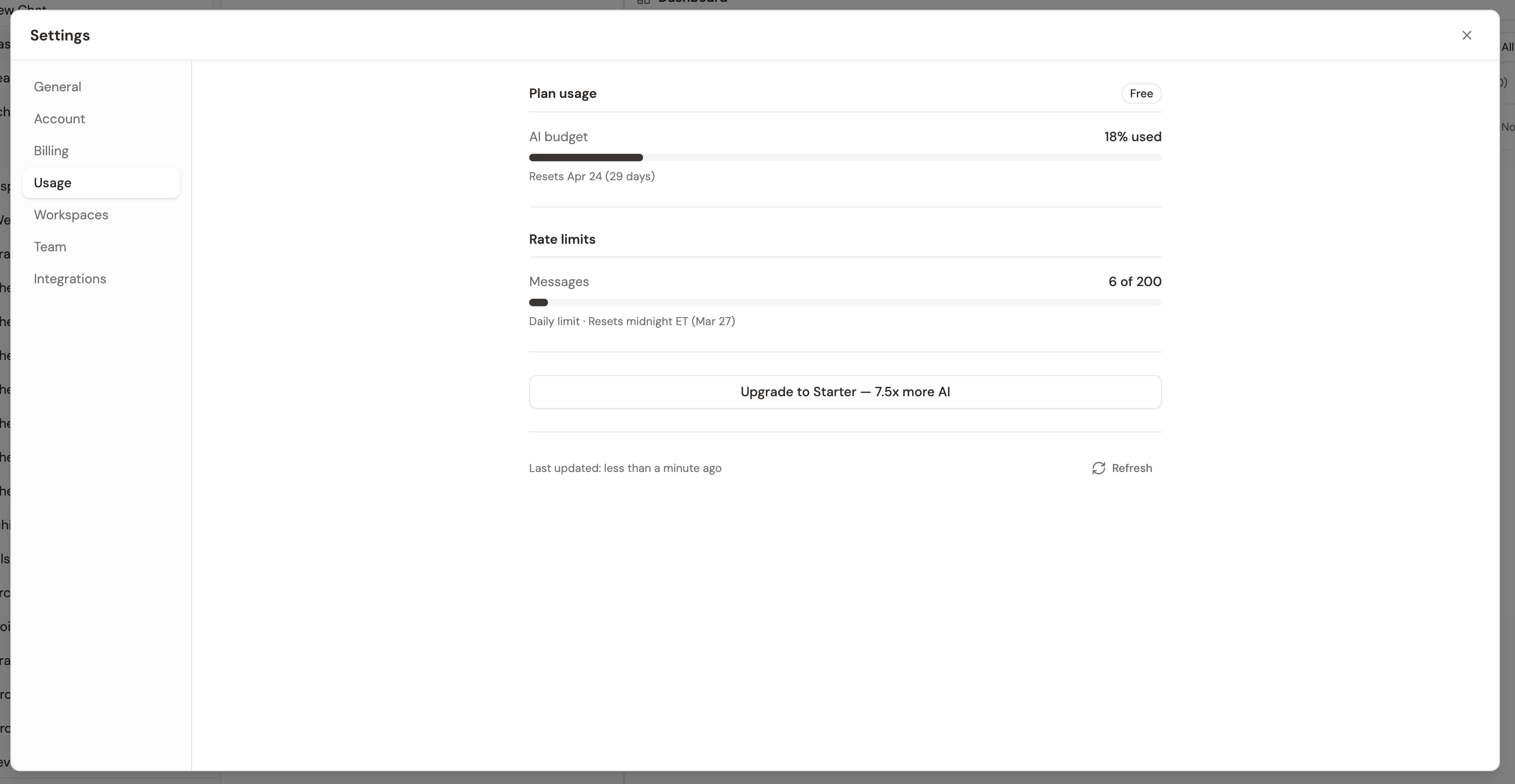
You’ll see how much of your monthly budget you’ve used, your current consumption rate, and an estimate of how many days remain at your current pace. No surprises.
Spending your budget wisely
The single most effective way to conserve budget is to give the AI better context up front. When Grantable has your org profile, uploaded source materials, and a specific prompt, it gets closer to what you need on the first try. Fewer back-and-forth iterations means less budget spent.
A few practical habits:
- Use Fast for quick questions. Save your Auto and Pro budget for the writing and analysis work that actually benefits from a more capable model.
- Upload source materials before you start writing. Past proposals, annual reports, and program descriptions give the AI evidence to work with instead of generating from scratch.
- Be specific in your prompts. “Draft the needs statement for the youth mentoring program using data from the 2025 annual report” uses less budget than “Write something about our programs” followed by three rounds of revisions.
- Right-size your conversations. Every message in a chat re-processes the whole thread, so a single long-running conversation costs more than several focused ones. Start a new chat when you switch tasks — same project, fresh workspace. See Managing Conversations for the mechanic.
- If you consistently hit your ceiling, upgrading to the next plan tier is usually more cost-effective than buying overage packs.
Pro tip: Run
/profileto build out your organization profile. A complete profile improves first-draft quality across everything the AI does — which means fewer iterations, less budget, and better results. It’s the single highest-ROI thing you can do.