AI grant writing that sounds like your organization
AI grant writing means using AI to research funders, break down RFPs and draft proposal sections, while a person keeps the final judgment. It works best when the AI already knows your organization: your past proposals, your program data and your voice. Grantable is an AI grant writing workspace built for exactly that.
Updated · First published Sep 24, 2026, replacing our older "AI-assisted grant writing" page. Oct 4, 2026: added the short answer to "can AI write a grant proposal?" and the AI tool vs. AI grants department section.
Can AI write a grant proposal?
Yes. AI can write the first draft of a grant proposal, grounded in your own documents: your past proposals, your program data and the funder’s guidelines. A person then checks the facts, the numbers and the fit with the funder before anything goes out. AI drafts, humans decide.
That covers most of a proposal: the need statement, the program description, the organizational background and the summary. Where AI goes wrong is predictable. Without your material, it writes copy that could describe any nonprofit. When it lacks a fact, it can invent one that sounds right, like a grant amount, a statistic or an eligibility rule.
Both problems shrink when the AI drafts from your own documents and the funder’s public record instead of the open web, and when someone checks every figure before it goes out. That person isn’t optional. Some funders, including NIH and Wellcome, don’t accept applications produced without meaningful human involvement. The rest of this guide shows how to split the work.
What AI does well in grant writing, and what still needs you
AI is good at the research, extraction and first-draft work that fills most of a grant writer’s week. It is not good at knowing things it hasn’t been told, and that covers most of what wins a grant. Split the work that way and you get the speed without the generic prose.
Hand it to the AI
Researching funders
Reading a foundation’s 990 filings and grant history to see what it actually funds, how much, and what it seems to care about, before you spend a week on the application.
Breaking down the RFP
Turning thirty pages of guidelines into a list of required sections, word limits, attachments and deadlines.
First drafts
Getting a need statement, program description or organizational background from a blank page to a workable draft, built from material you already have.
Reshaping and tightening
Adapting last year’s proposal to a new funder’s priorities and word limits, cutting 800 words to 500, reordering and proofreading, and catching sections that drifted from the prompt.
Keep for yourself
Strategy
Deciding which funders are worth the effort, and what you are really asking them to believe.
Relationships
What the program officer told you on the phone, and the history you have with a funder, aren’t in any document.
The numbers
Budgets, outcomes and statistics have to be checked against your records. AI can invent a plausible figure, and a funder will notice.
The final voice
The last pass that makes the proposal sound like the people who will run the program. Funders fund people.
Generic output comes from giving the AI too little context, not from using AI at all. For the craft of keeping your voice, read how to stop AI from making every nonprofit sound the same and the prompts that actually work for grant writing.
Is it okay to use AI for grant writing? What funders say
Usually yes, as long as the ideas and the final judgment are yours. The funders that have published policies don’t ban AI-assisted writing. They draw the line at proposals that AI wrote without a person, and they hold you responsible for every word. Policies differ in the details, though, and they keep changing, so check the current guidelines for each application.
National Institutes of Health (NIH)
NIH has the strictest stance of the three. From the September 25, 2025 receipt date onward, NIH does not consider applications “substantially developed by AI” to be the applicant’s original ideas. If it finds AI-generated content after an award, it can treat that as research misconduct. NIH also says it uses AI-detection technology, and it now caps each principal investigator at six applications a year. Using AI to edit, check or organize is a different thing from having it write the science.
Source: NIH notice NOT-OD-25-132 (July 17, 2025)
National Science Foundation (NSF)
NSF encourages proposers to say in the project description whether and how they used generative AI, but doesn’t require it. Proposers are responsible for the accuracy and authenticity of everything they submit, including anything AI helped write. NSF reviewers may not upload proposals into unapproved AI tools.
Source: NSF notice to the research community on AI (December 14, 2023; updated May 21, 2026)
Wellcome
Wellcome explicitly lets applicants use generative AI to prepare applications. Substantive use, such as developing ideas, summarizing data or generating an abstract, has to be declared on the form. Minimal use, like translation or improving the English, doesn’t. Applicants can’t use AI to generate an application, or sections of one, without human involvement, and they must remove anything false or hallucinated.
Source: Wellcome policy on the use of generative AI (last updated April 8, 2026)
Most private and community foundations haven’t published a policy. If the RFP says nothing, it’s reasonable to use AI the way you would use a capable colleague and to disclose it if asked. If you aren’t sure, ask the program officer. It’s a normal question in 2026, and the answer tells you what the funder values.
Can funders tell AI wrote it, and will they reject it?
Not reliably by detection. AI detectors produce false positives and are easy to fool, and funders tend to care more about disclosure and substance than about which tool you used. Reviewers judge fit, evidence and outcomes. What gets a proposal rejected is writing that is generic, unsupported or out of step with the guidelines, which is also what unedited AI tends to produce.
A proposal built from your real programs and data, with a person shaping the argument, reads as yours because it is. That is also where the ethical line sits: don’t submit a claim you haven’t checked, and make sure the proposal describes your organization’s real work. Our longer piece, can funders tell when a grant was written with AI?, goes through the evidence.
How to use AI for grant writing: a 5-step workflow
This order works with any AI tool. Context comes first, then requirements, then drafting, and a person does the final edit. The notes describe how each step works in Grantable, but you can do the same by hand in a general chatbot. It just takes more copying and pasting.
-
Give the AI your organization first
Generic output comes from an AI that knows nothing about you. Before you ask for a single paragraph, share your website and upload a past proposal, an annual report or your boilerplate. In Grantable, these go into your workspace’s Library, and the AI draws on them whenever it writes. You do this once, not every chat.
-
Break down the RFP before you write
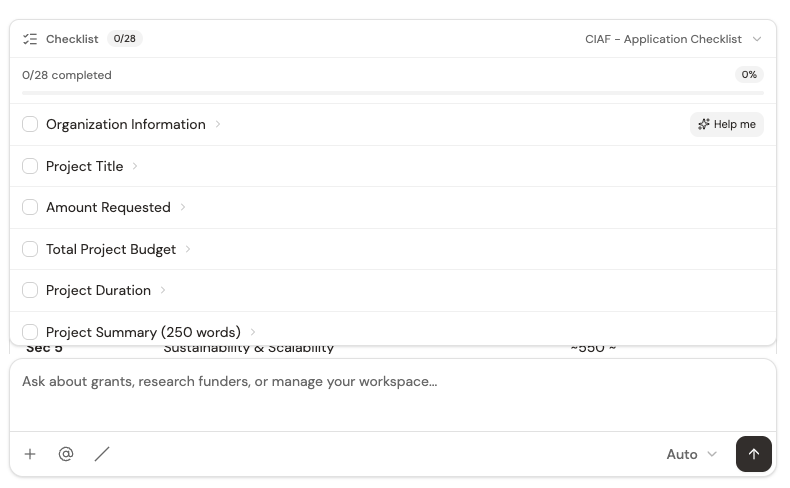
Upload the guidelines as a PDF and ask for the requirements. The AI pulls out every required section, word limit, attachment and deadline into a checklist that stays with the chat, so the draft is built against the funder’s questions rather than a template.
-
Draft one section at a time
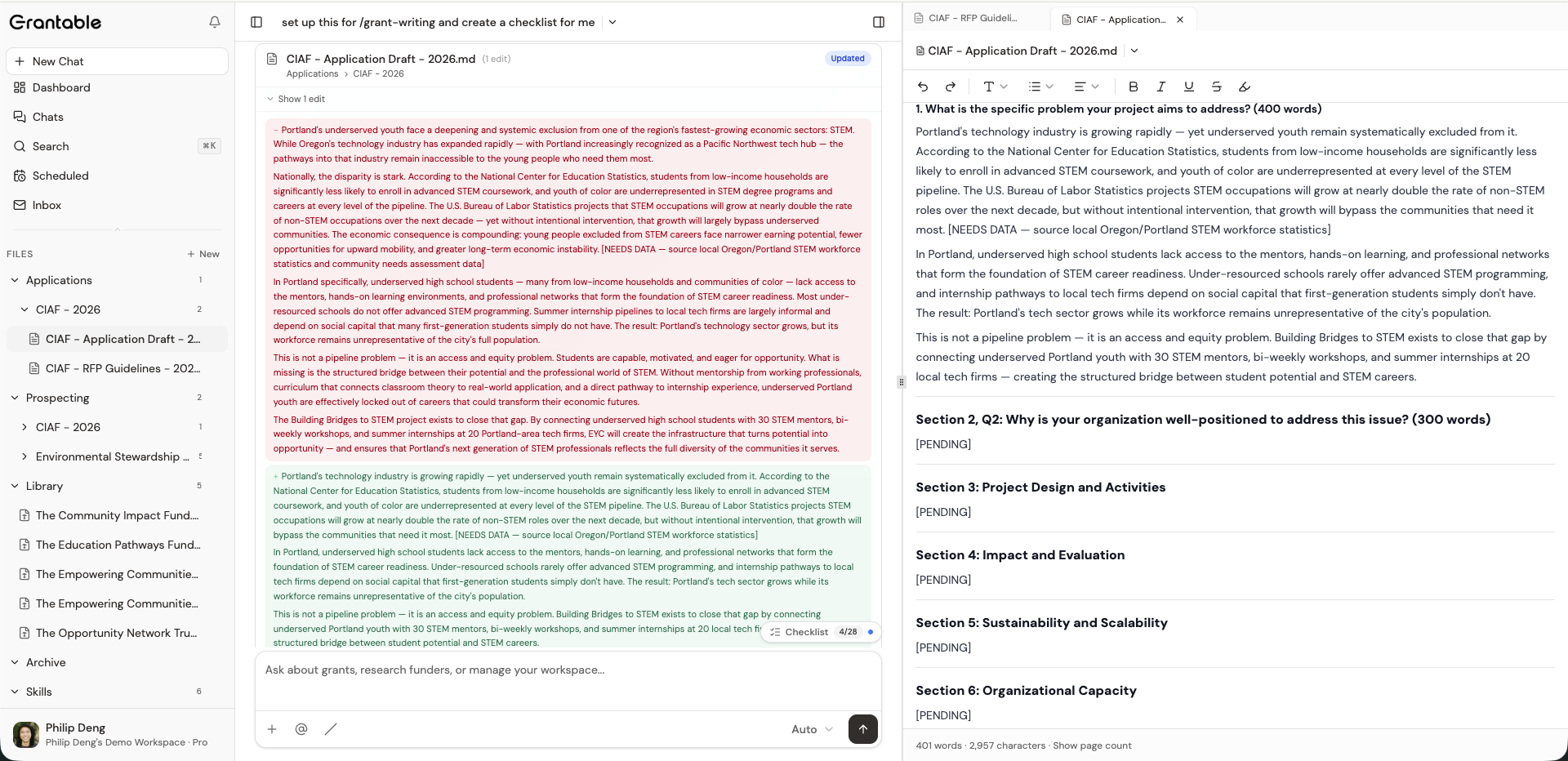
Ask for one section at a time: “Draft the need statement using our 2025 community assessment.” Each draft is saved as a document in the application’s folder, where you can edit it directly. It autosaves, and you can look back through earlier versions.
-
Check it against the requirements
Go back to the checklist. Are all the required sections there? Is each one within its limit? Is every figure one you can source? Where the AI didn’t have the data, it should leave a marker like [NEEDS DATA] instead of filling the gap with something that sounds right.
-
Edit like a person, then submit
Read the whole proposal aloud. Tighten the argument, fix the voice and verify every claim. Invite a colleague to comment inline, then download the final version as DOCX or PDF for the funder’s portal.
Using AI responsibly: a checklist
- Feed it your own material. Past proposals, mission, program data and outcomes, so the draft sounds like your organization and not the open web.
- Ground every figure. Each grant amount, statistic and eligibility detail should trace back to your records or the funder’s documents. Treat any number you can’t trace as a draft, not a fact.
- Keep the judgment. Which funders to pursue, what the argument is, and the final call on what’s true stay with a person.
- Read the funder’s AI rules. Check the guidelines for each application, and disclose your use of AI when the funder asks for it.
Before step one, make sure the funder is worth writing for. In Grantable, the AI can look up a funder’s giving from its public 990 filings and assess how well it fits your organization. The method is in our guide to grant prospecting. To check AI drafts faster in step four, try the spot-check technique.
ChatGPT vs. a purpose-built AI grant writer
ChatGPT can help with grant writing. The leading chatbots all write well. What they lack is your workspace: your documents, the funder’s record and the RFP’s requirements. You have to supply those every time, then carry each answer into your document by hand. A purpose-built tool starts from them and writes where you edit.
| A general-purpose chatbot | Grantable |
|---|---|
| You re-explain your mission in every conversation | Starts from your Library: your profile, past proposals and reports |
| Competent drafts that could belong to any nonprofit | Drafts built from your real programs, data and past language |
| Knows nothing about the funder unless you paste it in | Funder profiles and grant history from public IRS 990 filings |
| Requirements live in your head or a separate doc | The RFP becomes a checklist that sits next to the draft |
| Drafts scattered across chat threads | Each application has its own folder, and every draft autosaves with version history |
| You copy each answer into Google Docs and rewrite it there | The draft is written into the application’s document, and you edit it in place |
| Each new section starts cold, without the ones before it | It reads the draft so far before writing the next section, so the sections hang together |
| You enforce your house style by hand, every time | Keep a style guide in your Library and every draft follows it |
If you already pay for ChatGPT and like it, keep using it for quick jobs. For the full head-to-head, read Grantable vs. ChatGPT for grant writing.
An AI tool or an AI grants department?
A tool waits for you to open it. Nothing happens until you type. Grantable is an AI grants department instead. Its work is split across desks, two of which run on a schedule, and you manage all of them:
- Prospecting finds funders and grants that fit your organization, on a schedule, and saves each match with the sources it used.
- Writing drafts letters of inquiry and applications from your Library and what it knows about each funder.
- Management runs the Daily Check each morning, keeps an eye on deadlines, and looks after the routines the other desks run on.
Staffed by AI. You manage it — it adds the capacity. You choose which funders to go after, you edit every draft, and you decide what goes out. Nothing is submitted until you say so.
Which AI tool should you use?
It depends on how much you write. If you write one to three proposals a year, a general chatbot is often enough. If you run a pipeline of grants with a team, a tool that keeps your organization and your funder research in one place saves more time. We compare ten tools on the same five criteria in the best AI grant writing tools, and rank the free plans in the best free AI for grant writing.
Privacy: what happens to your proposals
Before you upload a proposal, a budget or a beneficiary story to any AI tool, find out where that data goes and whether it’s used to train models. Consumer chatbot settings vary by plan, and the defaults aren’t always what you’d expect. Our grant professional’s guide to AI privacy explains what happens to your data and what to ask any vendor.
For Grantable, the answers are on our Trust & Security page. Your content is never used to train AI models, and our AI providers are contractually prohibited from training on it. Data is encrypted in transit and at rest. The same page gives a straight account of where our independent SOC 2 audit stands.
Whatever tool you use, don’t paste in personal information about the people you serve unless the funder requires it and your data policy allows it.
Try AI grant writing free
Grantable’s Free plan includes the core workspace: funder research, RFP checklists, drafting and the document editor. The main limit is how much you can do per day; scheduled tasks need Pro. You get 5 chat messages a day and file imports up to 10 MB, and you can save and share your work. That’s enough to set up your organization and draft a section or two of a real proposal.
When you’re writing weekly, Starter is $50 a month and Pro is $150 a month, with no per-seat fees. Full details are on the pricing page.
Questions people ask about AI grant writing
Will AI replace grant writers?
It isn’t likely to. AI takes over the parts of the job that were never the point: reformatting, first drafts and hunting through RFPs. The parts that win grants stay with people. Those are choosing the right funders, building relationships with program officers, and knowing what your programs actually achieve. Grant writers who use AI well can take on more applications and spend more of their time on strategy.
Can ChatGPT help with grant writing?
Yes, especially for editing and rephrasing. It has two limits. You have to re-supply your organization’s context every session, and it has no funder data. You also need to check its facts, because a general chatbot can invent statistics. See Grantable vs. ChatGPT.
Does AI work for federal grants?
Yes, for the right tasks. Federal RFPs are long and precise, so pulling out the requirements and checking compliance is where AI helps most. Federal agencies also have the most explicit AI rules. NIH won’t treat applications substantially developed by AI as original, and NSF encourages you to disclose any use. Keep the research ideas and technical content yours, and read the current notice for the agency you are applying to.
Draft your next proposal in your own voice.
Share your website, upload a past proposal and bring the RFP. Grantable drafts from what you’ve already written, and you make the final call.